

DevTalents

Alma for Odoo: Pay in Instalments

Alma official partner: let your customers pay in 1x–12x installments.

  • #BNPL
  • #French Bank
  • Developed by DevTalents
  • Support by the team that wrote it
  • Installation on request
Billy, the DevTalents mascot, presenting the Odoo module

What the module does

  • Approved by Alma

    DevTalents is an Alma partner: the module was reviewed by the Alma team, which relies on us for its support and maintenance.

  • Pay now or in 2, 3, 4, 6, 8, 10 or 12 instalments

    Each plan is a payment method you activate, with its own description and minimum and maximum amounts.

  • Alma widget on the product page and the cart

    Customers see the instalment amounts under the price, in colour or monochrome, with or without border.

  • Product categories excluded from Alma

    A clear notice is shown on the product, cart, order and invoice when a product cannot be paid with Alma.

  • Orders confirmed by server notification

    Alma notifies Odoo directly, so the order is confirmed even if the customer closes the browser right after paying.

  • Full and partial refunds from Odoo

    Open the payment, click Refund and enter the amount: the customer is reimbursed through Alma.

  • Test connection button

    Checks the API key, shows the merchant name and compares the plans set in Odoo with your Alma contract.

  • eCommerce, customer portal and payment links

    Orders and invoices can be paid on the website, from the portal or from a link sent by email; Alma fees are displayed per plan.

In pictures

Alma pay in installments in Odoo, screen by screen

Real screenshots, taken on an Odoo shop connected to the Alma demo account.

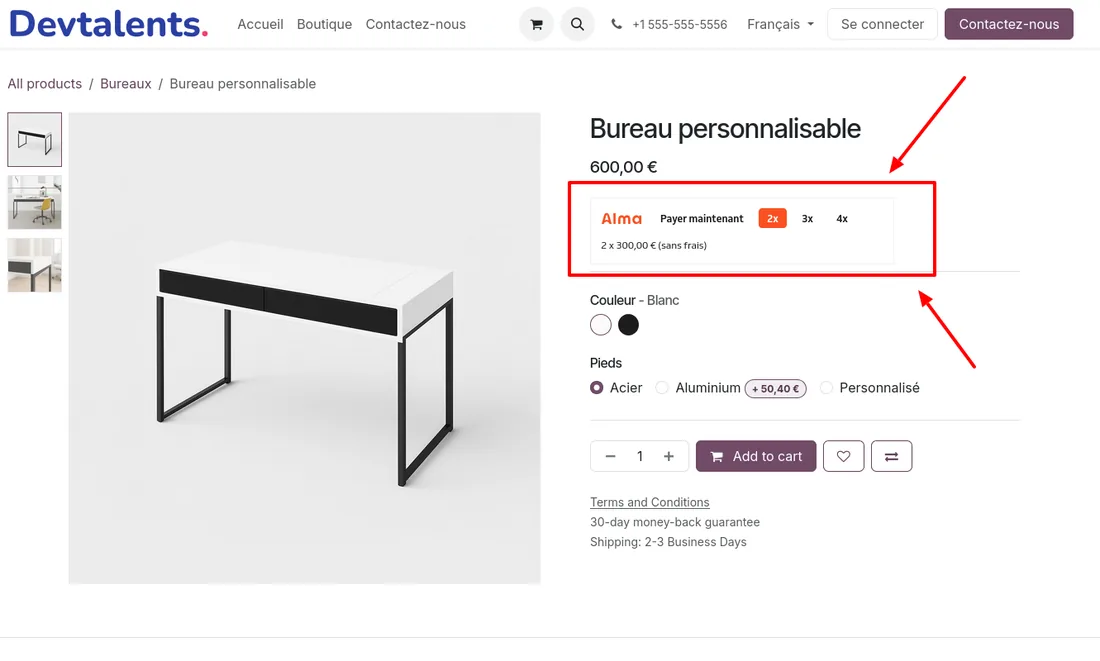
Alma badge with pay in 2, 3 or 4 installments under the price of an Odoo eCommerce product

Installments shown on the product page

Under the price, the Alma badge shows what the customer would pay in 2, 3 or 4 installments, before the product is even in the cart.

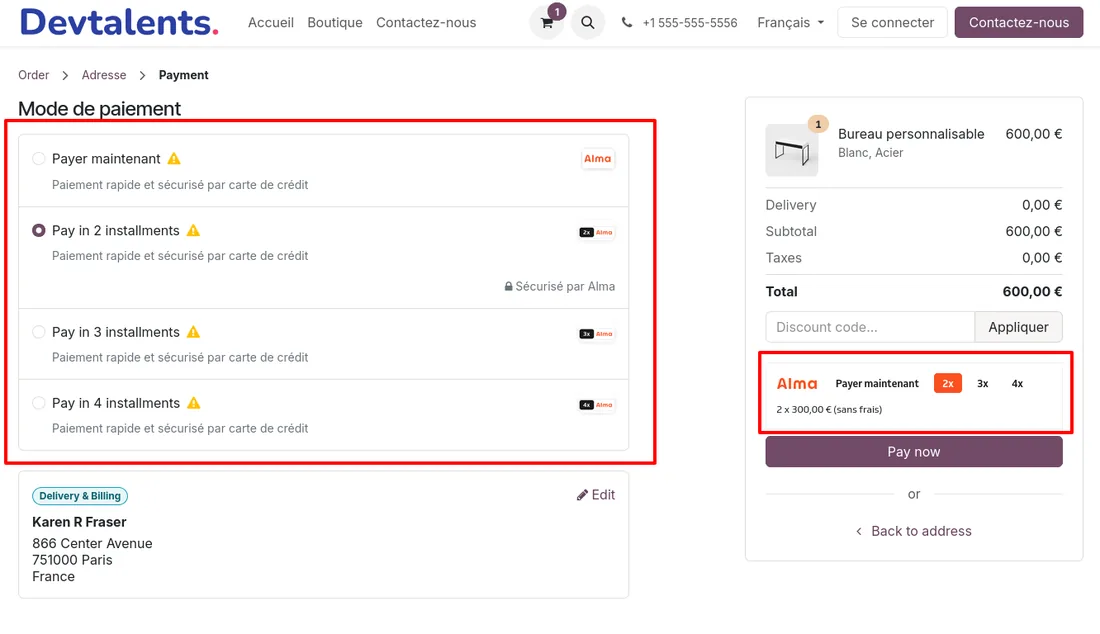
Alma pay in 2, 3 or 4 installments options on the Odoo checkout page

One line per plan at checkout

The customer picks Pay now, 2, 3 or 4 installments among the plans you turned on. The cart summary repeats the amount of each installment.

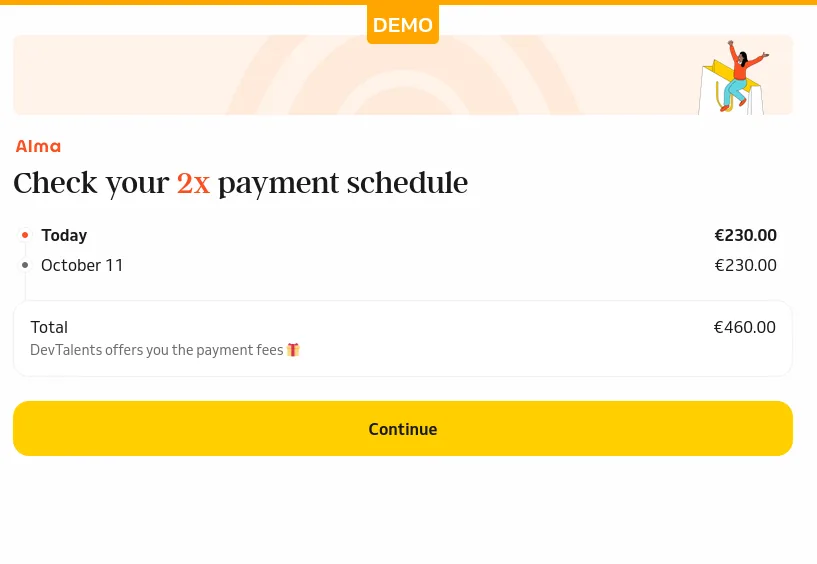
Pay in 2 installments schedule on the secure Alma page

The schedule checked at Alma

On the secure Alma page, the customer sees the dates and amounts of each installment, and any fees.

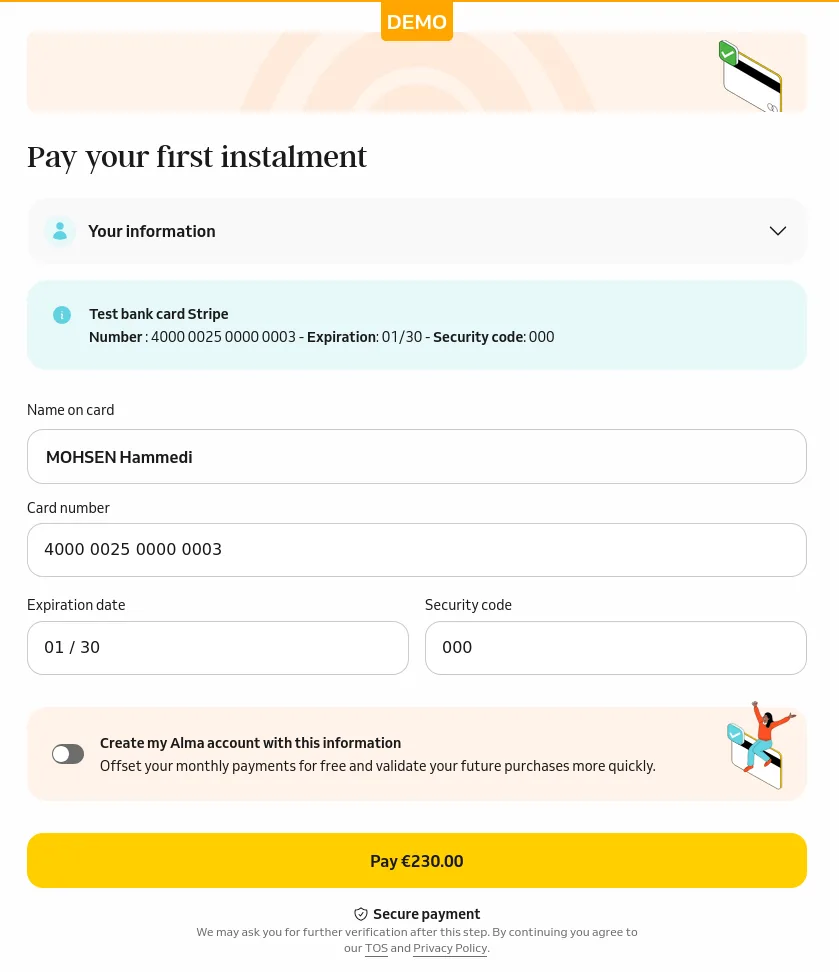
Card payment of the first Alma installment, in demo mode

The first installment paid by card

The customer types the card at Alma and pays the first installment. Alma collects the next ones, not your shop.

List of Alma refunds created from the payment in Odoo

Refunds issued from Odoo

From the payment, your team refunds in full or in part. Each refund stays linked to the original payment for reconciliation.

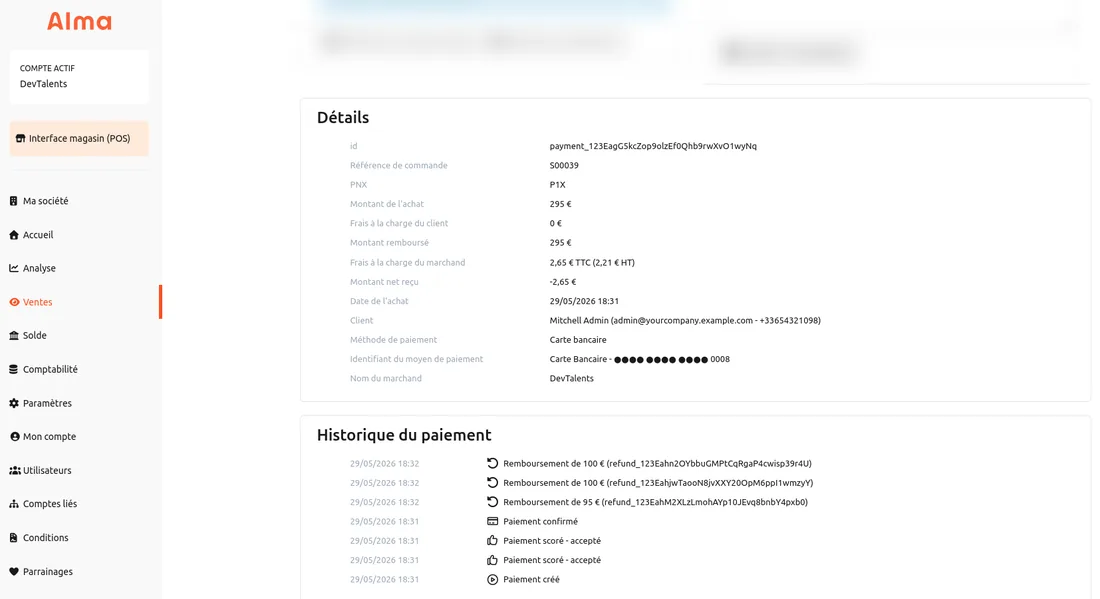
Alma payment history showing the refunds sent by Odoo

The same refunds at Alma

The payment history in the Alma dashboard lists every refund sent by Odoo, with nothing to type twice.

Before you choose

One line per plan or "Pay with Alma": which one to offer?

The Alma module for Odoo gives you two ways to present buy now, pay later at checkout. Turn on the one that suits your shop.

One line per planA single "Pay with Alma" line
Where the customer picks the planOn your Odoo checkout pageOn the Alma page
What the customer sees at checkoutPay now, 2x, 3x, 4x, 6x, 8x, 10x or 12x, as you chooseOne single line
Minimum and maximum amountsSet for each planSet once
Alma badge on product and cartYesYes

Do you also sell in store? Our Alma POS module brings the same plans to the Odoo Point of Sale.

Getting started

What to get ready with Alma before installing the module

Everything is in your Alma dashboard. Allow a few minutes if your merchant account is already open.

  • The plans of your contract: pay now, 2, 3, 4 installments or longer plans, with or without fees for the customer.
  • Your account keys: the live key, the test key and the Merchant ID, to paste in Odoo.
  • Excluded product categories: read the Alma terms, then tick in Odoo the categories that cannot be paid in installments.
  • Your country of operation: it sets the consumer credit notices shown next to each offer.
  • The Inventory app: if you ship with Odoo, plan the free delivery tracking module that comes with the module.

Alma settles its plans in euros. A shop that sells in another currency will not show Alma at checkout: check the pricelist of your website before going live.

With the module

An Odoo agency behind the module

Buying the module is the first step. We can take care of the rest with you.

Installation and setup

We install the module on your database, enter your credentials and test the whole flow before going live.

Support by its developers

Questions and fixes are handled by the team that wrote the module, not by a ticket relay.

Odoo support

Tailored adaptations

Specific rules for your business go in a separate module, so updates stay simple.

Odoo development
Setup

Put the module into service in four steps

  1. Buy it on the Odoo Store

    The licence is sold by Odoo; the module is then available for your database.

  2. Install it

    On Odoo.sh or on your own server, like any Odoo module.

  3. Configure it

    Enter the credentials of your provider and choose the options you need.

  4. Test, then go live

    Validate the whole flow in test mode, then switch to production.

Offer Monthly Payments in Odoo with Alma

Alma is a powerful payment service that allows your customers to split their purchases into monthly payments. With our Odoo integration, enjoy secure and flexible transactions tailored to modern customer expectations.

Read the article

Questions about Alma Payment Provider

Does the Alma module show the consumer credit notices?

Yes. Next to each offer, Odoo shows the APR, the warning, the representative example and the legal block that Alma provides for your country of operation: France, Belgium, Luxembourg, the Netherlands, Italy, Germany, Portugal, Spain or Ireland. In Belgium, the text follows the language of the customer.

Should Alma be told when an order ships?

Under the Consumer Credit Directive, Alma needs to know when the orders it finances are shipped. The delivery tracking module, included with the Alma module, sends Alma the shipment, the carrier and the parcel tracking numbers as soon as you validate the delivery in Inventory.

Can installments be blocked for some products?

Yes. Pick the excluded categories on the Alma provider. As soon as a product from these categories is in the cart, Alma is no longer offered and a message tells the customer on the product page, the cart, the order and the invoice.

Is the order confirmed if the customer closes the browser after paying?

Yes. Alma notifies your Odoo server directly after the payment, and Odoo reads the payment back from Alma before confirming the order. A payment is never collected without a confirmed order.

Does Alma work outside the online shop?

Yes. Customers can pay an order or an invoice in installments from their customer portal, or from a payment link sent by your team. For your store, see the <a href="/odoo-apps/alma-pos">Alma POS</a> module.

Does the module work on Odoo Online?

No: Odoo Online does not accept third-party modules. It installs on Odoo.sh or on your own Odoo server.

Can you install and configure it for us?

Yes. We install the module, configure it with your credentials, test it in test mode and switch to production with you.

Ask for an installation

Who supports the module?

The DevTalents team that developed it: fixes, compatibility with new Odoo versions and configuration questions.

Can the module be adapted to our needs?

Yes. We add the rules specific to your business in a separate module, so that updates stay simple.

Odoo development

Same category

Similar Odoo modules

Alma POS - Odoo module

Payment Providers

Alma POS

Alma in the Odoo Point of Sale: your customers pay in store now or in 2 to 12 instalments, on their phone. QR code on the cashier and customer display, SMS link or payment on the store's screen, order validated as soon as the customer has paid, refunds from the POS.

All our Odoo modules

A module to adapt or to create?

Tell us what you need: we reply within 48 hours.

Discuss your project
Billy, the DevTalents mascot, answering a message on his phone