

DevTalents

Monetico for Odoo: Card Payments (CIC, Crédit Mutuel)

Monetico (CIC, Crédit Mutuel) payment provider supporting CB, Visa and Mastercard with secure 3-D Secure flow.

  • #3-D Secure
  • #CB / Visa / Mastercard
  • #French Bank
  • Developed by DevTalents
  • Support by the team that wrote it
  • Installation on request
Billy, the DevTalents mascot, presenting the Odoo module

What the module does

  • Secure Monetico hosted page with 3D Secure 2

    Card entry and authentication happen at Monetico (frictionless and challenge); card data never goes through your server.

  • Signed notifications checked before any update

    Every Monetico notification (CGI2) is sealed with HMAC-SHA1 and verified before the transaction changes.

  • eCommerce, customer portal and payment links

    Customers pay their orders on the website and their invoices from the portal or a link sent by email, without an account.

  • Deferred payment: authorize, then capture or void

    With a deferred-payment TPE, the amount is authorized at checkout and collected or cancelled later from Odoo.

  • Partial capture

    Collect part of the amount, for example for an order shipped in several parcels, then capture or void the rest (Monetico partial payment option).

  • Full and partial refunds from Odoo

    Sent to the Monetico « Recrédit » service; amounts already refunded are taken into account.

  • Automatic reconciliation

    A scheduled action asks Monetico for the real status of pending transactions, in case a notification was lost.

  • Monetico tab on every transaction

    Authorization number, masked card, refusal reason and real payment date sent by Monetico.

  • Payment page in the customer's language

    German, English, Spanish, French, Italian, Japanese, Dutch, Portuguese or Swedish when Monetico supports it.

In pictures

The Monetico module for Odoo, from cart to refund

Real screenshots, taken on the Monetico test platform of Crédit Mutuel and CIC.

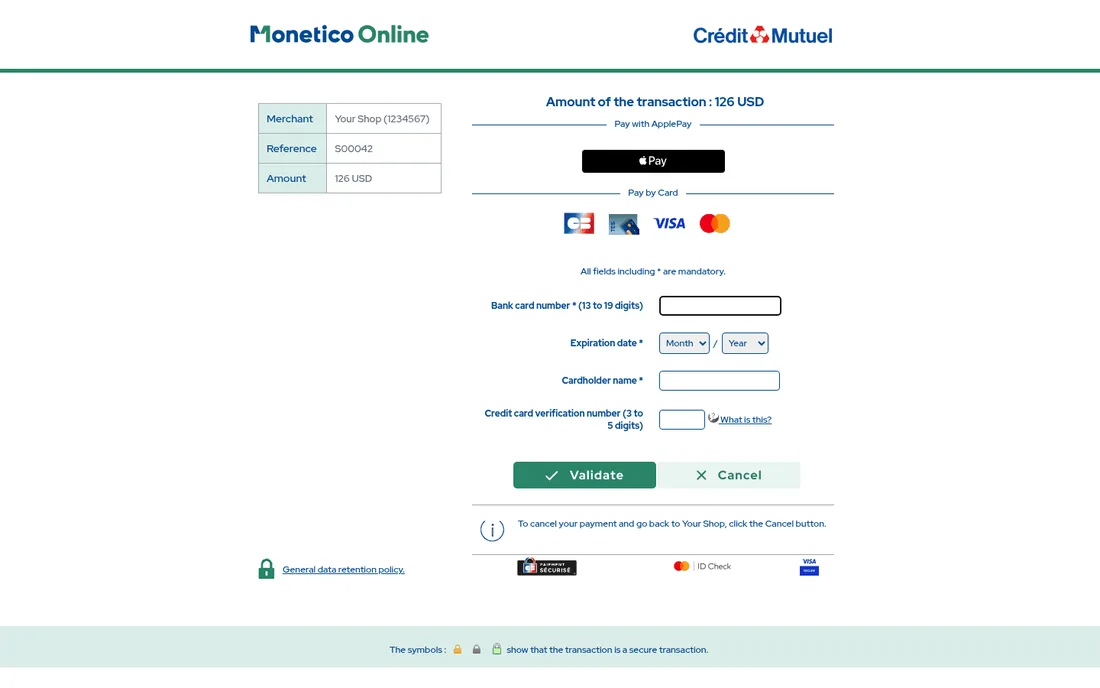
Monetico Online payment page of Crédit Mutuel opened from an Odoo order

The Monetico payment page

The customer enters a CB, Visa or Mastercard card on the secure Monetico page, then returns to your shop. Other means depend on your contract.

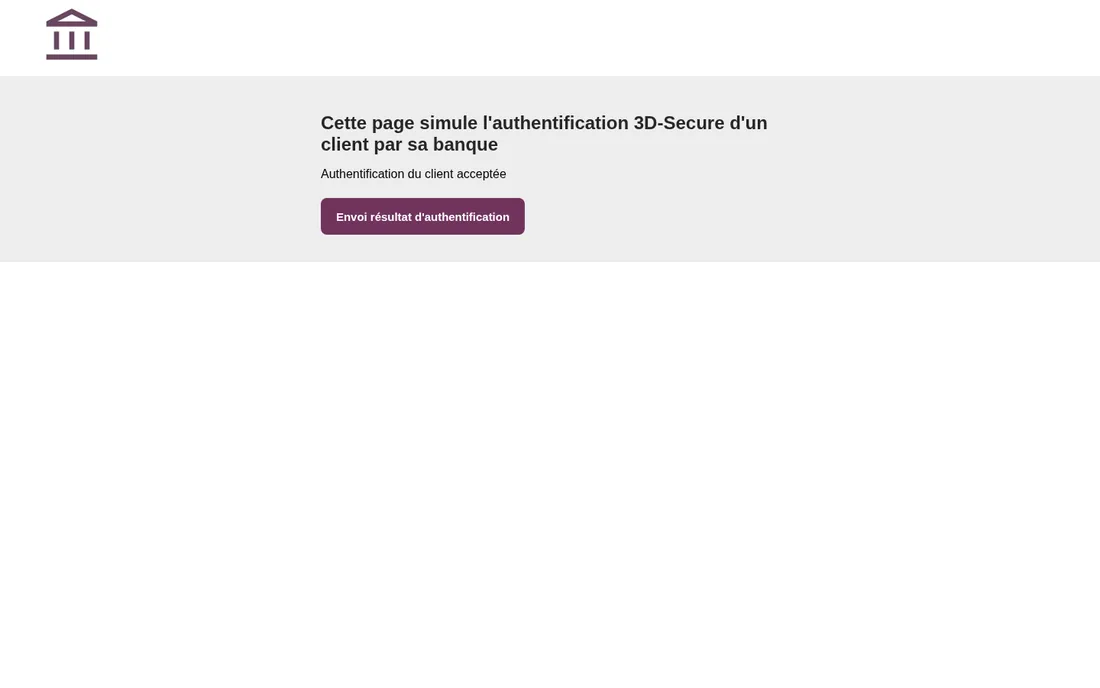
3-D Secure authentication of a Monetico card payment on the test platform

3-D Secure handled by Monetico

When the customer's bank asks for a confirmation, Monetico takes care of it. Shown here: the simulator of the test platform.

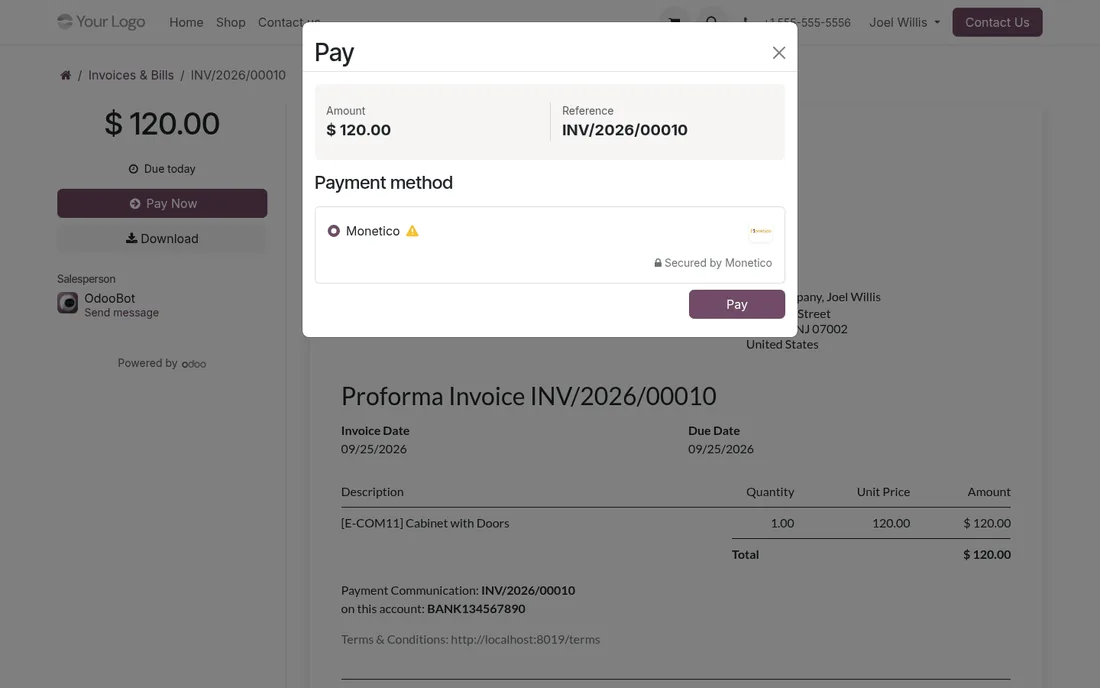
Invoice paid with Monetico from the Odoo customer portal

Invoices paid online

From the customer portal or a link received by email, the customer pays the invoice with Monetico. It turns to paid as soon as Monetico confirms.

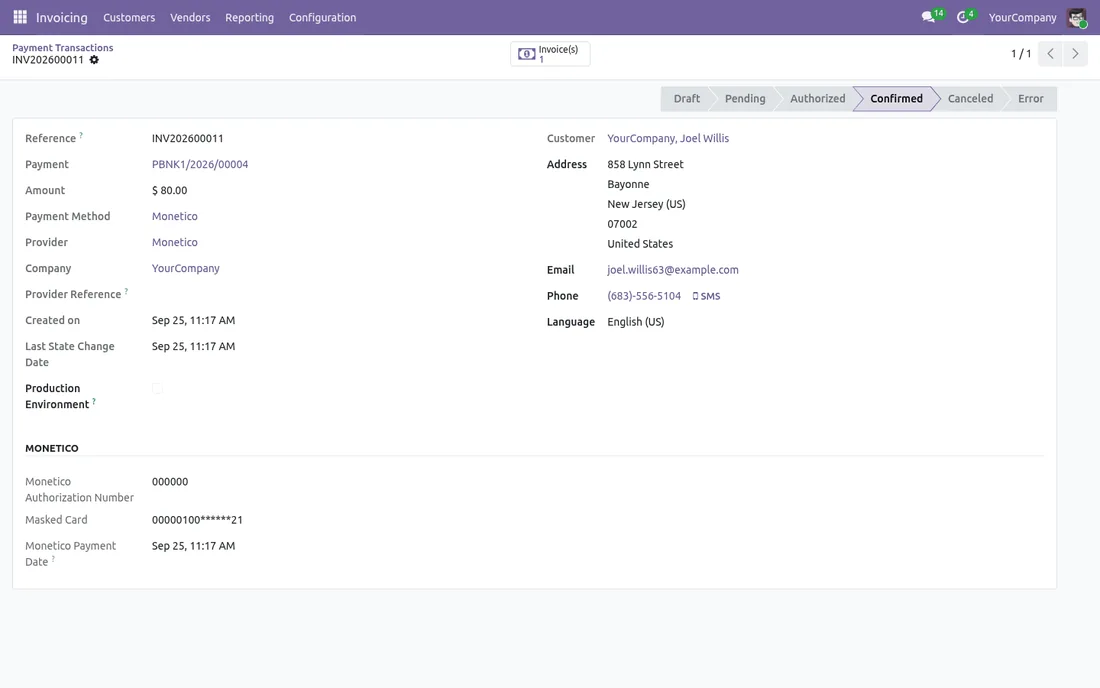
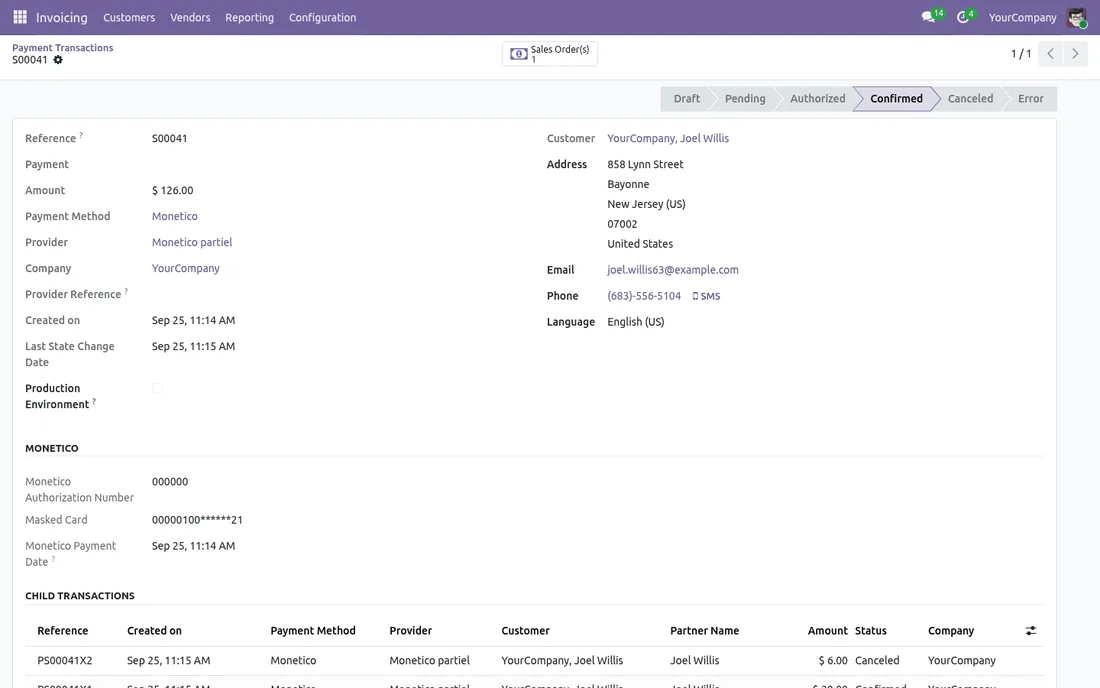
Monetico tab of an Odoo transaction with authorization number and masked card

The bank details of every payment

Authorization number, masked card, refusal reason if any and the real payment date: enough to answer a customer without opening the Monetico dashboard.

Monetico partial capture with its linked transactions in Odoo

Capture in several steps

With a deferred-payment TPE, your team captures parcel by parcel. Each capture is listed under the original payment, and the rest is voided.

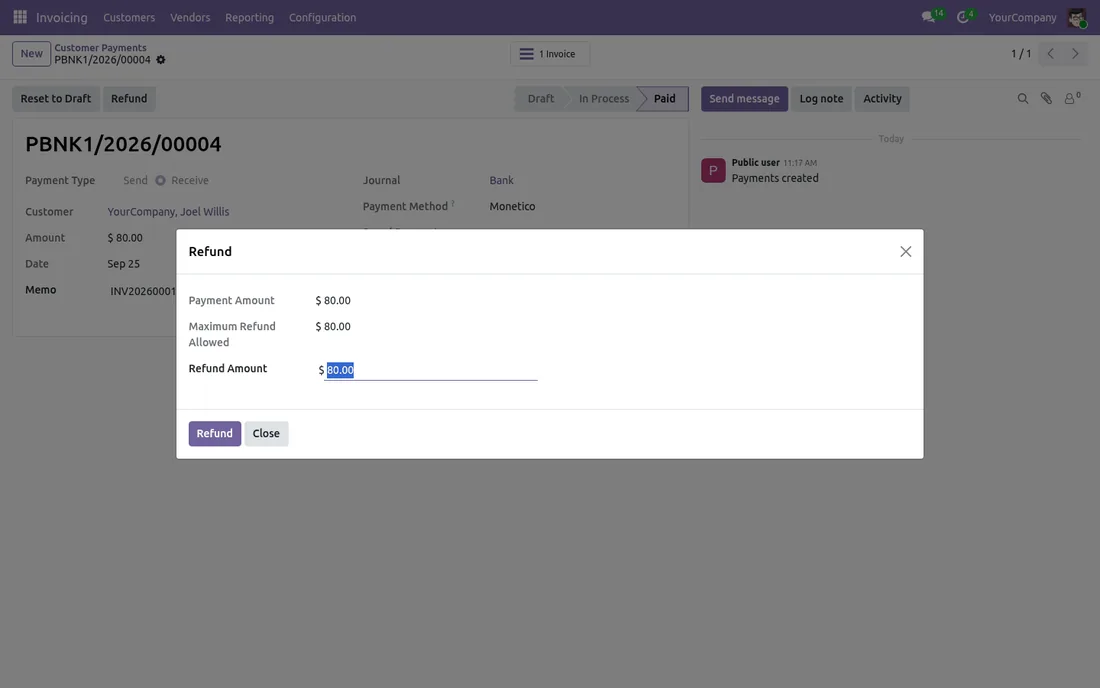
Refund of a Monetico payment from the Odoo customer payment

Refund from the payment

Click Refund and enter the amount: Odoo shows the maximum still refundable and sends the request to Monetico.

Before you choose

Which Monetico module for your Crédit Mutuel or CIC contract?

Each use of Monetico Online matches an option of your contract. This module is the base; the other two are installed on top of it.

What you needWhat to ask MoneticoOdoo module
One-off card paymentsA Monetico Online TPEMonetico Payment Provider (this module)
Capture at shipping, at once or in several stepsA deferred-payment TPE, with the “paiement partiel” option for several capturesMonetico Payment Provider (this module)
Pay in 2, 3 or 4 instalmentsA TPE with the split payment optionMonetico Split Payment
Subscriptions and saved cardsThe “paiement express” option and PaymentService accessMonetico Recurring Payments

Is your back office called Monetico Retail? That is another platform, with other credentials: see our Monetico Retail module.

Getting started

What to ask Monetico before installing the module

Your Crédit Mutuel or CIC adviser, or Monetico support, sends you these details and turns the services on for your TPE.

  • The TPE credentials: TPE number, company code and security key, to enter in Odoo. A second TPE (deferred payment, for instance) goes in a second provider.
  • The confirmation address of your Odoo: to register in the Monetico settings. It is what confirms the order even when the customer closes the payment page.
  • The “Recrédit” service: required to refund from Odoo. Monetico enables it for your TPE and for the IP address of your server.
  • The “paiement partiel” option: only if you want to capture an order in several steps. Without it, a deferred-payment TPE captures in full.

After installing, remember to turn on the scheduled action Monetico: reconcile pending transactions. It ships disabled, and it is what catches a payment whose confirmation never arrived (server down, network cut).

With the module

An Odoo agency behind the module

Buying the module is the first step. We can take care of the rest with you.

Installation and setup

We install the module on your database, enter your credentials and test the whole flow before going live.

Support by its developers

Questions and fixes are handled by the team that wrote the module, not by a ticket relay.

Odoo support

Tailored adaptations

Specific rules for your business go in a separate module, so updates stay simple.

Odoo development
Setup

Put the module into service in four steps

  1. Buy it on the Odoo Store

    The licence is sold by Odoo; the module is then available for your database.

  2. Install it

    On Odoo.sh or on your own server, like any Odoo module.

  3. Configure it

    Enter the credentials of your provider and choose the options you need.

  4. Test, then go live

    Validate the whole flow in test mode, then switch to production.

Monetico Integration in Odoo: Card Payment Module for Crédit Mutuel and CIC

Monetico is a French payment gateway developed by Crédit Mutuel, CIC, and Desjardins. With our Odoo module, enjoy a secure and seamless integration for your online payments.

Read the article

Questions about Monetico Payment Provider

Does the Monetico module work with CIC as well as Crédit Mutuel?

Yes. Monetico Online is the online payment solution of the Crédit Mutuel and CIC group: the module connects to your Monetico TPE whichever bank opened it.

What if the customer closes the page before coming back to the shop?

The order is still confirmed: Monetico notifies your Odoo directly at the registered confirmation address. If that message gets lost, the reconciliation job asks Monetico and updates the transaction.

Can an order be captured over several shipments?

Yes, with a deferred-payment TPE and the “paiement partiel” option. You capture each parcel's share from Odoo, then the balance or its cancellation. Without that option, the capture is done at once.

Can one order be refunded in several steps?

Yes. Each refund, full or partial, starts from the customer payment in Odoo: amounts already refunded are taken into account, and Odoo never offers more than what is left. The “Recrédit” service must be active on your TPE.

Can one Odoo hold several Monetico TPEs?

Yes, each TPE is a payment provider. Duplicate the provider for a second TPE, then publish on the shop the one your customers should use: only one TPE is active at a time on the website.

Does the module work on Odoo Online?

No: Odoo Online does not accept third-party modules. It installs on Odoo.sh or on your own Odoo server.

Can you install and configure it for us?

Yes. We install the module, configure it with your credentials, test it in test mode and switch to production with you.

Ask for an installation

Who supports the module?

The DevTalents team that developed it: fixes, compatibility with new Odoo versions and configuration questions.

Can the module be adapted to our needs?

Yes. We add the rules specific to your business in a separate module, so that updates stay simple.

Odoo development

Same category

Similar Odoo modules

Alma Payment Provider - Odoo module

Payment Providers

Alma Payment Provider

Alma official partner: let your customers pay in 1x–12x installments. Eligibility widget, category exclusion and Alma-approved integration.

Alma POS - Odoo module

Payment Providers

Alma POS

Alma in the Odoo Point of Sale: your customers pay in store now or in 2 to 12 instalments, on their phone. QR code on the cashier and customer display, SMS link or payment on the store's screen, order validated as soon as the customer has paid, refunds from the POS.

All our Odoo modules

A module to adapt or to create?

Tell us what you need: we reply within 48 hours.

Discuss your project
Billy, the DevTalents mascot, answering a message on his phone