

DevTalents

Monetico Recurring Payments for Odoo

Monetico (CIC, Crédit Mutuel) recurring payments for Odoo: the card is saved at the first payment with 3D Secure, then Odoo charges it automatically through the Monetico PaymentService API, for subscription renewals and back-office payments.

  • #3-D Secure
  • #CB / Visa / Mastercard
  • #French Bank
  • #New
  • #Tokenization
  • Developed by DevTalents
  • Support by the team that wrote it
  • Installation on request
Billy, the DevTalents mascot, presenting the Odoo module

What the module does

  • Automatic renewals of Odoo Subscriptions

    Each renewal is charged on the card the customer saved, and the invoice is paid automatically.

  • Card saved at the first payment

    On the secure Monetico page with 3D Secure; Odoo only keeps an anonymous reference of the card.

  • Server-to-server charges

    Through the Monetico PaymentService API, sealed with your security key.

  • Odoo decides when and how much

    Upsells, prorated amounts, pauses and closings of subscriptions are followed.

  • Refused renewals handled by Odoo Subscriptions

    Reminders to the customer, retries and closing after the delay you set.

  • Back-office charges on a saved card

    For example an invoice paid with the customer's card, without sending a link.

  • Card changed by paying an invoice

    When a card expires, the customer pays one invoice on the Monetico page and the new card is used for the next renewals.

  • Never charged twice

    When Monetico does not answer, the renewal stays pending and is checked with the Monetico payment status service.

In pictures

Monetico recurring payments in Odoo

Real screenshots, taken with the Monetico test platform and the Odoo Subscriptions app.

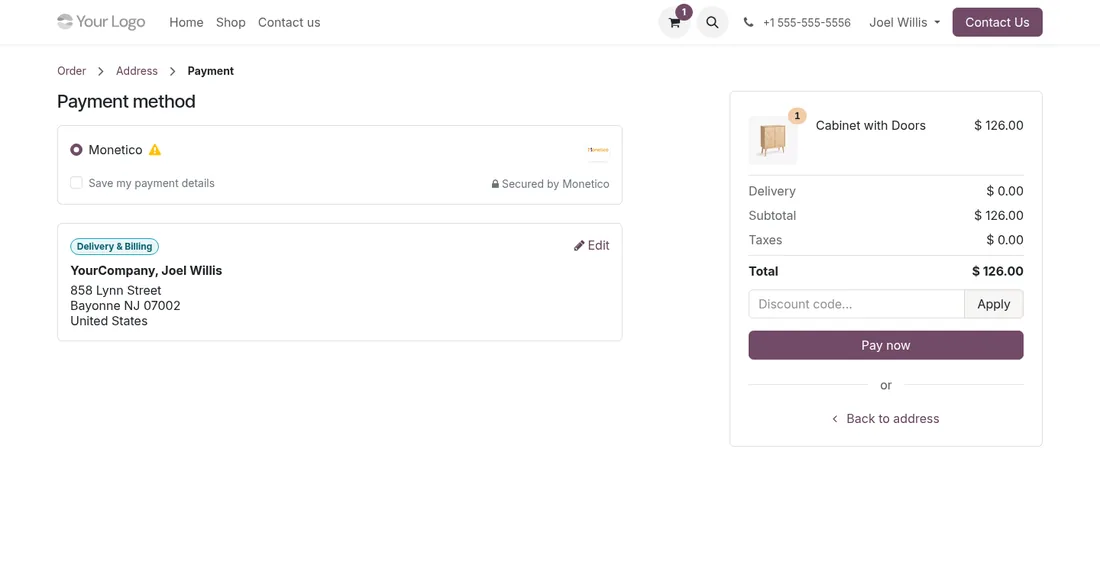
Monetico card saved at checkout on the Odoo eCommerce payment page

The card saved at the first purchase

The customer ticks “Save my payment details”. For a subscription, the card is always saved, as it will pay the renewals.

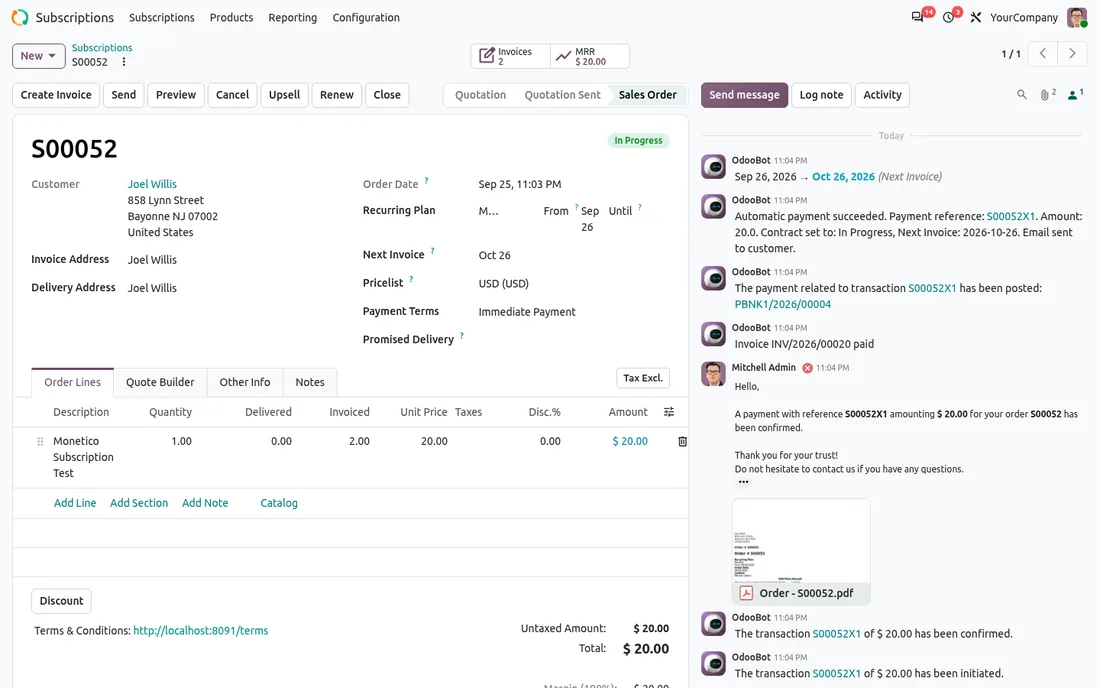
Odoo subscription renewed with an automatic Monetico charge on a saved card

The renewal paid on its own

On the due date, Odoo invoices the next period and charges the saved card. The history shows the successful payment, the paid invoice and the email sent to the customer.

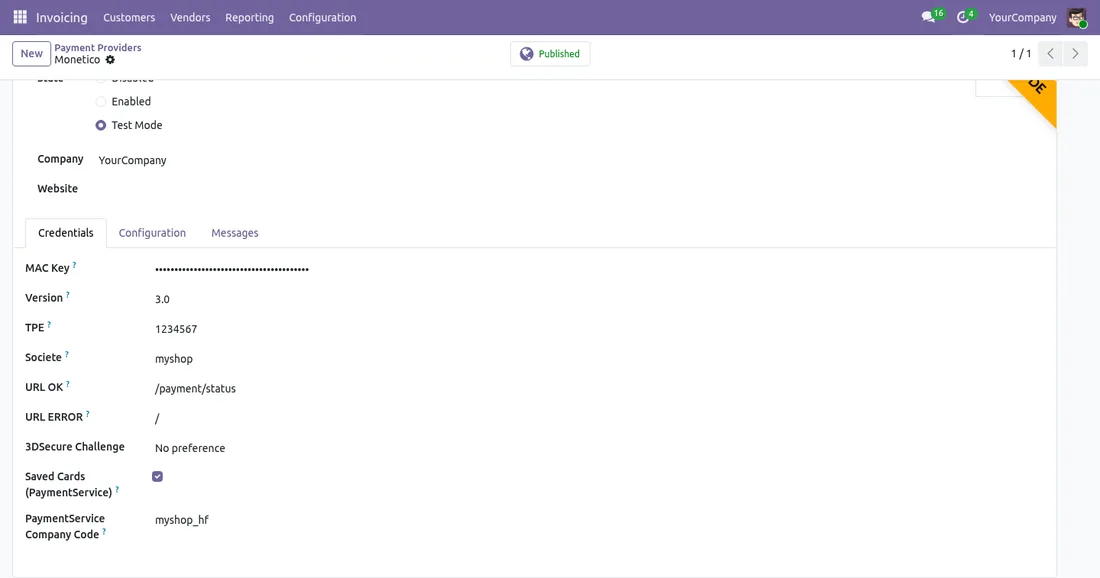
Monetico Recurring Payments settings in the Odoo Monetico provider

Two settings on your Monetico provider

Tick Saved Cards (PaymentService) and, if Monetico gave you one, enter the company code specific to PaymentService.

The journey

The life of a subscription paid by Monetico card

Odoo decides when and how much to charge. Monetico keeps the card and collects.

1

Sign-up

The customer pays the first period on the Monetico page, with the 3-D Secure of their bank. Monetico keeps the card; Odoo only stores an anonymous reference.

2

Every renewal

Odoo creates the invoice for the period and charges the card, with nothing to do for the customer. Upsells, prorated amounts, pauses and closings are followed.

3

A refused charge

The rules of your subscription plan apply: reminder to the customer, new attempts, then closing after the delay you chose.

4

An expiring card

The customer pays one invoice on the Monetico page with the new card. It replaces the old one for the next renewals.

Before you choose

Monetico recurring payments or split payment?

Both charge the customer's card several times, but they answer different needs.

Recurring payments (this module)Split payment
What forA subscription, with no end date set in advanceOne order paid in 2, 3 or 4 instalments
Who sets the date and amountOdoo, from the subscriptionYour Monetico contract
Monetico option“Paiement express” and PaymentService accessSplit payment, on a separate TPE
Odoo app neededSubscriptions (Enterprise) for renewalsNone on top

To spread one order over several payments, see Monetico Split Payment. Both modules come on top of Monetico Payment Provider.

Getting started

What to ask Monetico for subscriptions

Saved cards are an option of your Monetico Online contract. Your Crédit Mutuel or CIC adviser adds it to your TPE.

  • The “paiement express” option: it lets Monetico keep the customer's card.
  • PaymentService access: the service that lets Odoo charge a saved card without the customer.
  • The PaymentService company code, if it differs from the one of your payment page: Monetico creates it for that service.
  • The Odoo Subscriptions app: needed for automatic renewals. Without it, the module is used to pay invoices with a saved card.

Charges through PaymentService are collected straight away, with no deferred capture. If Monetico does not answer during a charge, the renewal stays pending while its status is checked with Monetico: a card is never charged twice.

With the module

An Odoo agency behind the module

Buying the module is the first step. We can take care of the rest with you.

Installation and setup

We install the module on your database, enter your credentials and test the whole flow before going live.

Support by its developers

Questions and fixes are handled by the team that wrote the module, not by a ticket relay.

Odoo support

Tailored adaptations

Specific rules for your business go in a separate module, so updates stay simple.

Odoo development
Setup

Put the module into service in four steps

  1. Buy it on the Odoo Store

    The licence is sold by Odoo; the module is then available for your database.

  2. Install it

    On Odoo.sh or on your own server, like any Odoo module.

  3. Configure it

    Enter the credentials of your provider and choose the options you need.

  4. Test, then go live

    Validate the whole flow in test mode, then switch to production.

Monetico Recurring Payments on Odoo: Subscriptions Paid Automatically

No more chasing customers every month for a subscription. With our Monetico Recurring Payments module, the card is saved at the first payment and Odoo charges every renewal automatically.

Read the article

Questions about Monetico Recurring Payments

Can the customer pay in one click on the shop with the saved card?

No. The saved card is only used for automatic charges: subscription renewals and payments started from the back office. On the shop, the customer always pays on the Monetico page.

Is Odoo Enterprise required?

For automatic renewals, yes: they come from the Subscriptions app, available in Enterprise. The module also works in Community to pay an invoice with a customer's saved card.

Can the amount charged change from one month to the next?

Yes. Odoo computes each renewal: an upsell, an added line or a prorated amount changes the charge, with nothing to do on the Monetico side.

Can a card be saved on a split payment TPE?

No. Saved cards are not available on a split payment TPE: recurring payments go through your usual Monetico TPE.

Does the module work on Odoo Online?

No: Odoo Online does not accept third-party modules. It installs on Odoo.sh or on your own Odoo server.

Can you install and configure it for us?

Yes. We install the module, configure it with your credentials, test it in test mode and switch to production with you.

Ask for an installation

Who supports the module?

The DevTalents team that developed it: fixes, compatibility with new Odoo versions and configuration questions.

Can the module be adapted to our needs?

Yes. We add the rules specific to your business in a separate module, so that updates stay simple.

Odoo development

Same category

Similar Odoo modules

Alma Payment Provider - Odoo module

Payment Providers

Alma Payment Provider

Alma official partner: let your customers pay in 1x–12x installments. Eligibility widget, category exclusion and Alma-approved integration.

Alma POS - Odoo module

Payment Providers

Alma POS

Alma in the Odoo Point of Sale: your customers pay in store now or in 2 to 12 instalments, on their phone. QR code on the cashier and customer display, SMS link or payment on the store's screen, order validated as soon as the customer has paid, refunds from the POS.

All our Odoo modules

A module to adapt or to create?

Tell us what you need: we reply within 48 hours.

Discuss your project
Billy, the DevTalents mascot, answering a message on his phone