

DevTalents

Monetico Split Payment for Odoo: 2, 3 or 4 Instalments

Monetico (CIC, Crédit Mutuel) split payment for Odoo: customers pay in 2, 3 or 4 monthly installments by card on the Monetico page.

  • #3-D Secure
  • #BNPL
  • #CB / Visa / Mastercard
  • #French Bank
  • #New
  • Developed by DevTalents
  • Support by the team that wrote it
  • Installation on request
Billy, the DevTalents mascot, presenting the Odoo module

What the module does

  • Pay in 2, 3 or 4 monthly instalments

    Customers enter their card once on the Monetico payment page and pay the first instalment.

  • Schedule set by your Monetico contract

    Number, dates and amounts of the instalments are those agreed with Monetico for the TPE: nothing to set in Odoo.

  • Order confirmed at the first instalment

    The order is validated as soon as Monetico collects the first payment.

  • One accounting payment per instalment

    Each instalment collected becomes a payment reconciled with the invoice, so the invoice shows what is really paid.

  • Refused instalments traced

    An instalment refused for good is recorded on the order and the invoice.

  • Daily synchronisation

    The module checks the Monetico schedule every day, in case a notification is lost.

  • Refund of any instalment

    From its own payment, through the Monetico « Recrédit » service.

  • Next to the standard Monetico payment

    Customers choose at checkout between paying at once and paying in instalments, above a minimum amount if you set one.

In pictures

Monetico split payment in Odoo

Real screenshots, taken on the Monetico test platform with a split payment TPE.

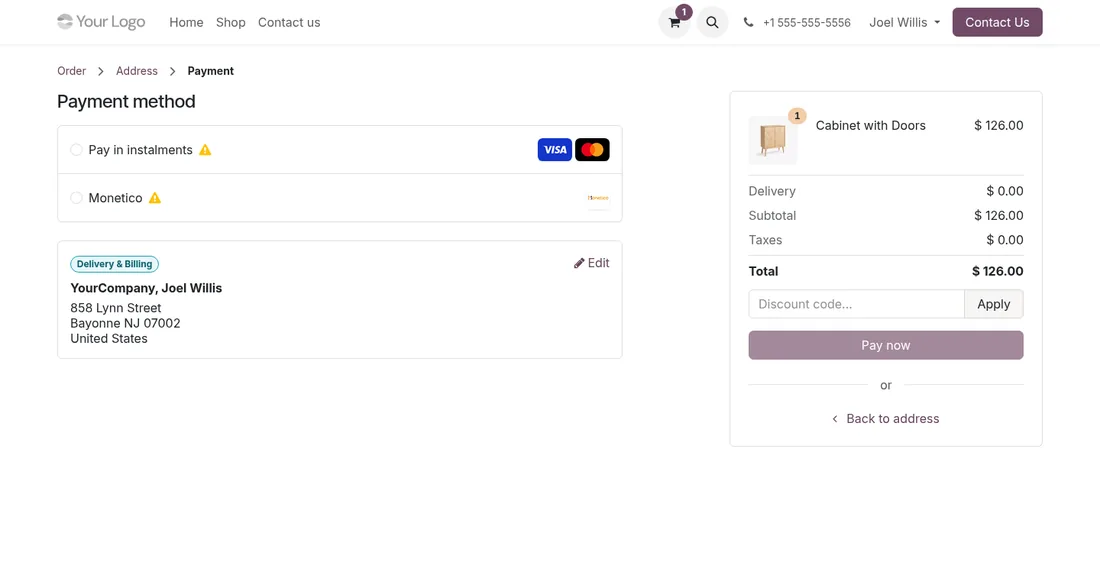
Monetico pay in instalments option on the Odoo eCommerce payment page

The choice at checkout

On the payment page, the customer sees “Pay in instalments” next to the one-off Monetico payment, and picks one.

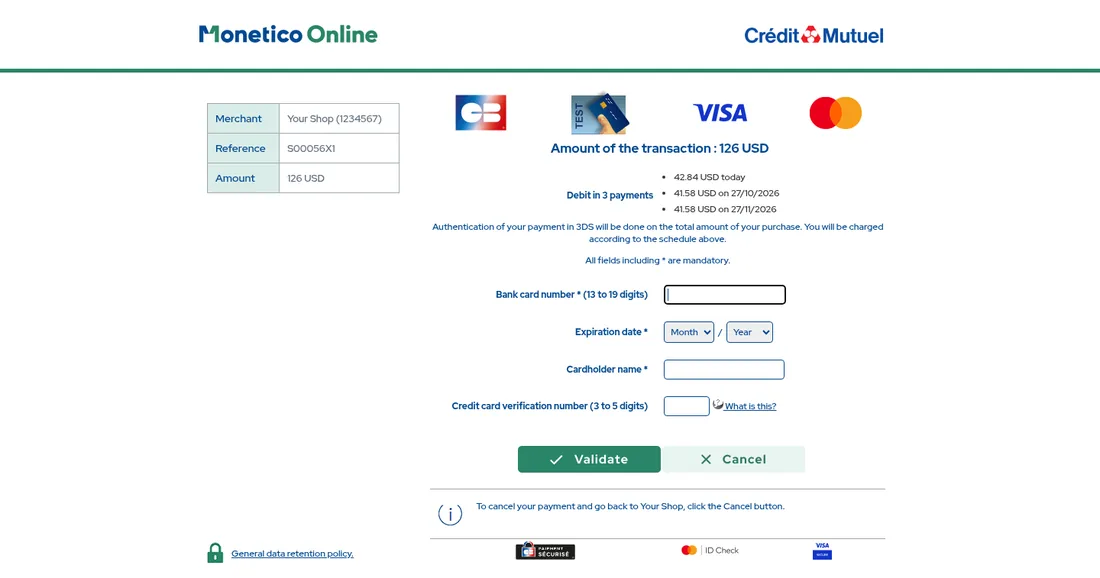
Crédit Mutuel Monetico page showing the schedule of a card payment in 3 instalments

The schedule shown by Monetico

Before entering the card, the customer sees the amount and date of each instalment. 3-D Secure covers the total amount of the purchase.

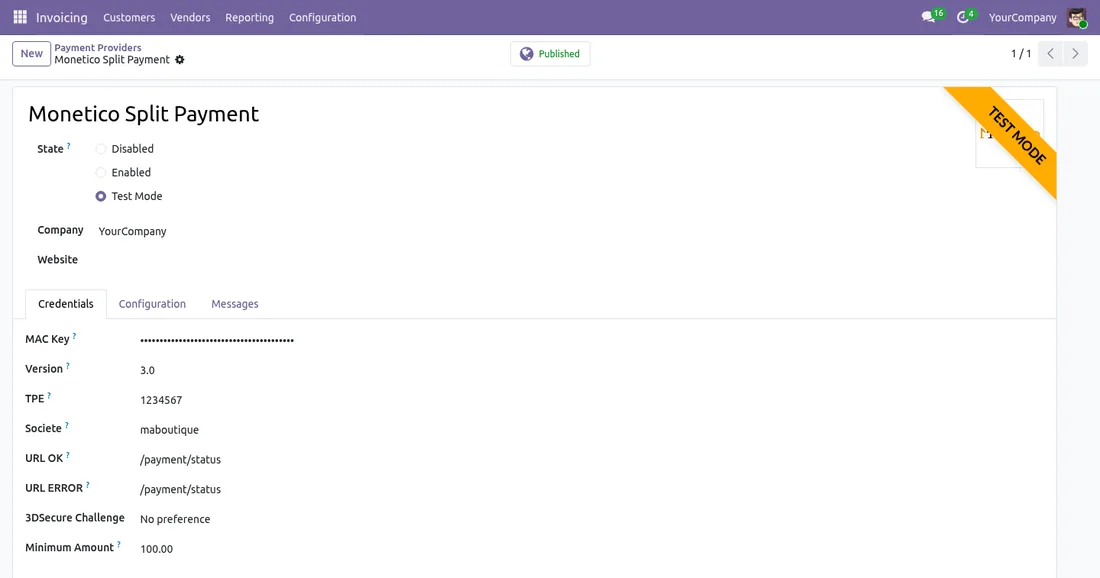
Monetico Split Payment module settings in Odoo with a minimum amount

A separate provider, a few fields

The credentials of the split payment TPE and, if you want, a minimum amount below which paying in instalments is not offered.

The journey

An order paid in 3 instalments with Monetico, step by step

Example with a 3-instalment contract and an order of €100.

1

On the order day

The customer enters the card once and pays €33.34. Monetico confirms and the order is validated in Odoo.

2

The next month

Monetico charges €33.33 on the same card and notifies Odoo. The instalment becomes a payment reconciled with the invoice.

3

The last instalment

The remaining €33.33 is charged one month later. The invoice then shows what was really collected, instalment by instalment.

4

If an instalment fails

When Monetico gives up after its retries, the refusal is logged on the order and the invoice. It is up to you to collect it from the Monetico dashboard or from the customer.

Before you choose

Monetico split payment or financed buy now, pay later?

Both let customers pay in instalments, but they do not work the same way for your cash flow.

Monetico split payment (this module)Financed instalments
Who charges the instalmentsMonetico, every month, on the customer's cardThe financing company (Oney, Alma, Floa...)
What you receive at orderThe first instalment, then the next ones month after monthDepends on the financing contract
A refused instalmentFlagged in Odoo, for you to collectHandled by the financing company, under its contract
What you needYour Monetico contract, with the split payment optionA contract with the financing company

For financed instalments, see our Oney 3x 4x, Alma and Floa modules.

Getting started

What to ask Monetico for payments in 2, 3 or 4 instalments

Split payment is an option of your Monetico Online contract. It comes on top of the Monetico Payment Provider module, to install first.

  • A TPE with the split payment option: the number of instalments, their dates and amounts are set in your contract for that TPE, not in Odoo.
  • The credentials of that TPE: TPE number, company code and security key, entered in the Monetico Split Payment provider.
  • The confirmation address of your Odoo registered for that TPE: this is how Monetico reports each instalment collected.
  • The “Recrédit” service: to refund an instalment from its own payment in Odoo.

On a split payment TPE there is no manual capture: Monetico charges the instalments itself. The module also checks the schedule with Monetico every day, so nothing is missed if a notification gets lost.

With the module

An Odoo agency behind the module

Buying the module is the first step. We can take care of the rest with you.

Installation and setup

We install the module on your database, enter your credentials and test the whole flow before going live.

Support by its developers

Questions and fixes are handled by the team that wrote the module, not by a ticket relay.

Odoo support

Tailored adaptations

Specific rules for your business go in a separate module, so updates stay simple.

Odoo development
Setup

Put the module into service in four steps

  1. Buy it on the Odoo Store

    The licence is sold by Odoo; the module is then available for your database.

  2. Install it

    On Odoo.sh or on your own server, like any Odoo module.

  3. Configure it

    Enter the credentials of your provider and choose the options you need.

  4. Test, then go live

    Validate the whole flow in test mode, then switch to production.

Pay in 3 Installments with Monetico on Odoo: the Split Payment That Boosts Sales

A 900 € basket is easier to buy as 3 × 300 €. With our Monetico Split Payment module, your customers pay in 2, 3 or 4 installments by card on your Odoo shop, and you get the order right away.

Read the article


Questions about Monetico Split Payment

How many instalments can the customer choose?

The customer does not choose: the number of instalments, from 2 to 4, is the one in your Monetico contract for the TPE.

When is the order confirmed?

As soon as Monetico collects the first instalment. The next ones then arrive each as a separate payment, linked to the same invoice.

Does the customer see the charges before paying?

Yes. The Monetico page shows the amount and date of each instalment before the card is entered. 3-D Secure is done once, on the total amount.

Can a single instalment be refunded?

Yes. Each instalment collected has its own payment in Odoo: you refund from that payment, in full or in part, without touching the others.

Does the module work on Odoo Online?

No: Odoo Online does not accept third-party modules. It installs on Odoo.sh or on your own Odoo server.

Can you install and configure it for us?

Yes. We install the module, configure it with your credentials, test it in test mode and switch to production with you.

Ask for an installation

Who supports the module?

The DevTalents team that developed it: fixes, compatibility with new Odoo versions and configuration questions.

Can the module be adapted to our needs?

Yes. We add the rules specific to your business in a separate module, so that updates stay simple.

Odoo development

Same category

Similar Odoo modules

Alma Payment Provider - Odoo module

Payment Providers

Alma Payment Provider

Alma official partner: let your customers pay in 1x–12x installments. Eligibility widget, category exclusion and Alma-approved integration.

Alma POS - Odoo module

Payment Providers

Alma POS

Alma in the Odoo Point of Sale: your customers pay in store now or in 2 to 12 instalments, on their phone. QR code on the cashier and customer display, SMS link or payment on the store's screen, order validated as soon as the customer has paid, refunds from the POS.

All our Odoo modules

A module to adapt or to create?

Tell us what you need: we reply within 48 hours.

Discuss your project
Billy, the DevTalents mascot, answering a message on his phone