
DevTalents

Oney for Odoo: Pay in 3 or 4 Instalments

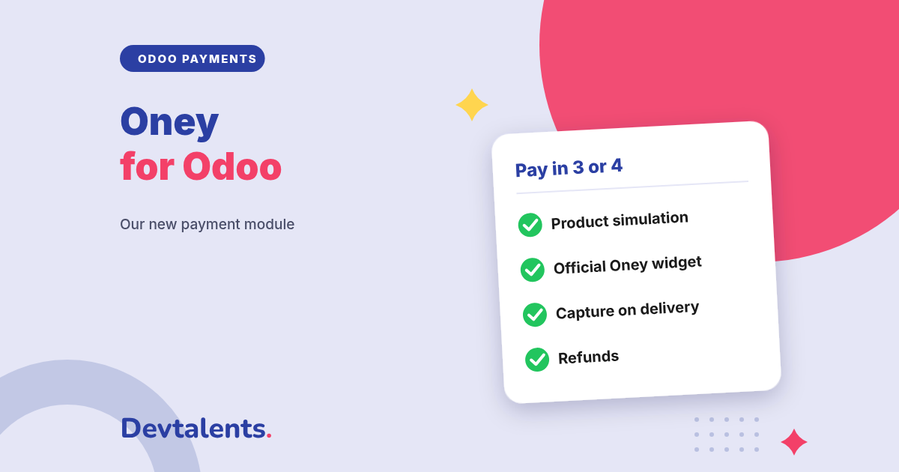
Oney 3x and 4x in Odoo: your customers pay in 3 or 4 instalments by card on the secure Oney page.

  • #BNPL
  • #CB / Visa / Mastercard
  • #French Bank
  • #New
  • Developed by DevTalents
  • Support by the team that wrote it
  • Installation on request
Billy, the DevTalents mascot, presenting the Odoo module

What the module does

  • Oney 3x and 4x by card

    Each offer is shown only when the amount is within the limits of your Oney contract, and the customer completes the financing on the secure Oney page.

  • Instalment simulation

    On the product page and in the cart, customers see the Oney offers available for the amount and simulate their instalments.

  • Official Oney widget at checkout

    The schedule, the APR and the legal notice for consumer credit are shown under the selected offer, as in the official Oney plugins.

  • Capture on delivery

    With Odoo Inventory, the payment is confirmed at Oney once the whole order is delivered, as Oney requires; without it, confirm automatically or by hand.

  • Full and partial refunds from Odoo

    Open the payment, click Refund and enter the amount: Oney reduces or refunds the customer's instalments.

  • Orders confirmed even if the browser is closed

    Oney notifies Odoo directly and a scheduled check reads back open payments every 30 minutes.

  • Offers synchronised from your Oney contract

    One click imports the offer codes and the minimum and maximum amounts of your contract.

  • 7 countries

    France, Belgium, Spain, Italy, the Netherlands, Portugal and Romania, one provider per Oney contract, in euros or in lei.

In pictures

Oney pay in 3 or 4 installments in Odoo, screen by screen

Real screenshots of an Odoo shop connected to the public Oney Italy demo account, hence the Italian texts in the Oney windows.

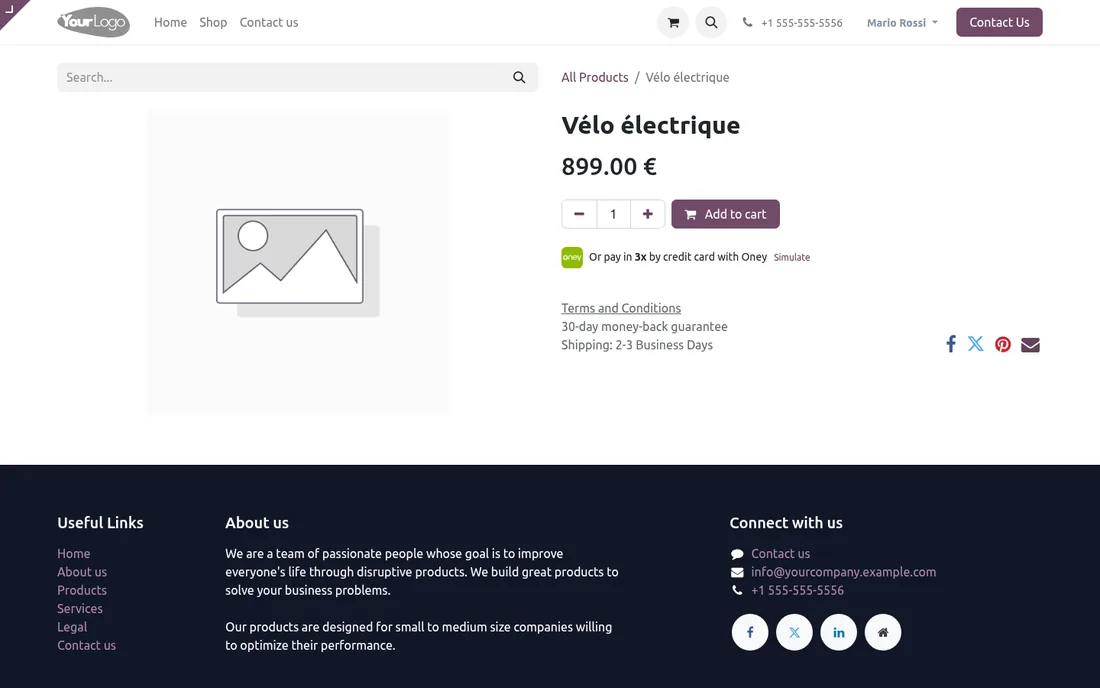
Oney pay in 3 by card offer on a product page of the Odoo eCommerce

The Oney offer under Add to cart

On the product page, the customer reads "Or pay in 3x by credit card with Oney" as soon as the price is within the amounts of your contract.

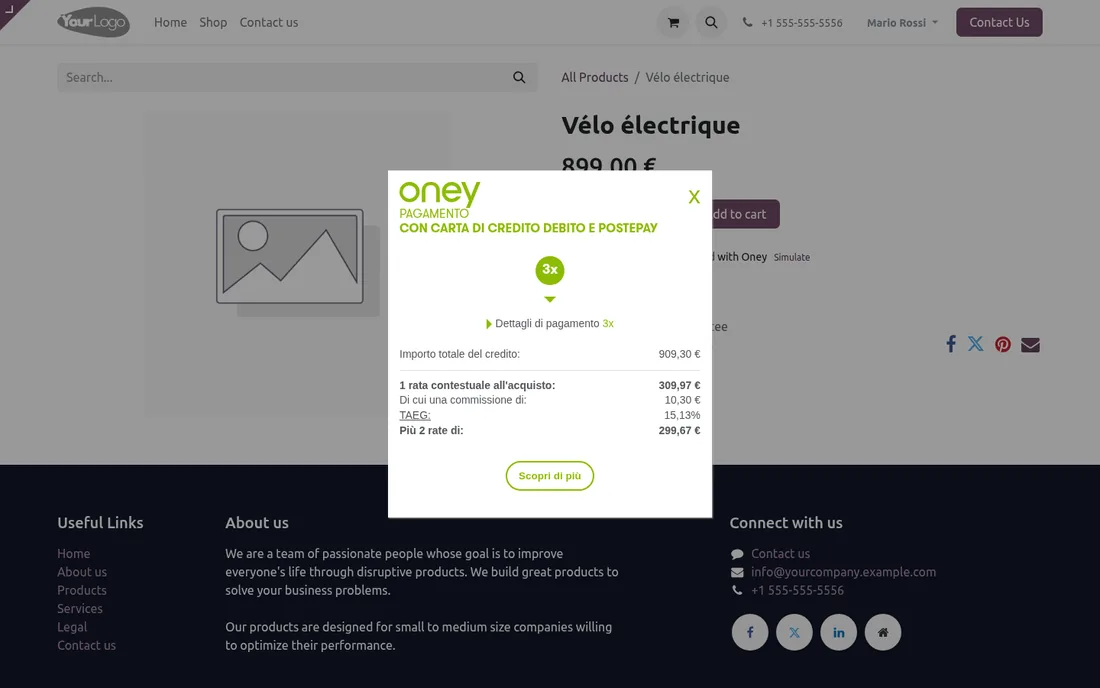
Oney pay in 3 simulation with APR and installments, opened from the Odoo product page

Simulating the installments

The Simulate link opens the Oney window: total credit amount, first payment, fee, APR and the amount of the next installments.

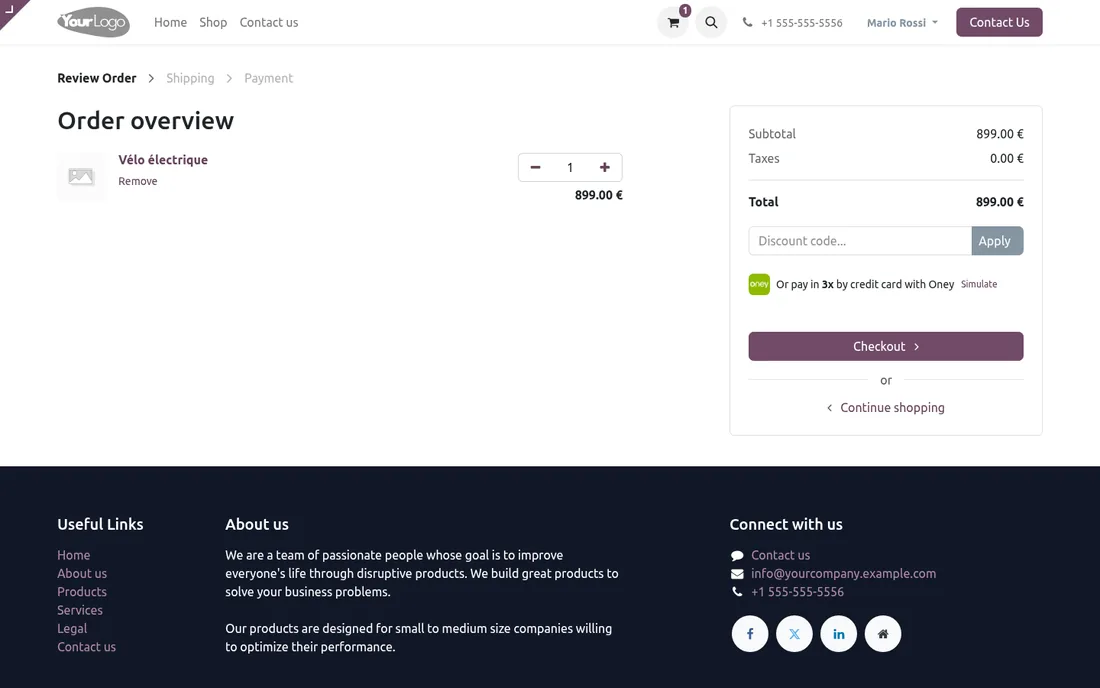
Oney pay in 3 block under the Odoo cart total

The same offer in the cart

The Oney block follows the cart total: it hides when the customer leaves the amounts of the offer and comes back when the total fits again.

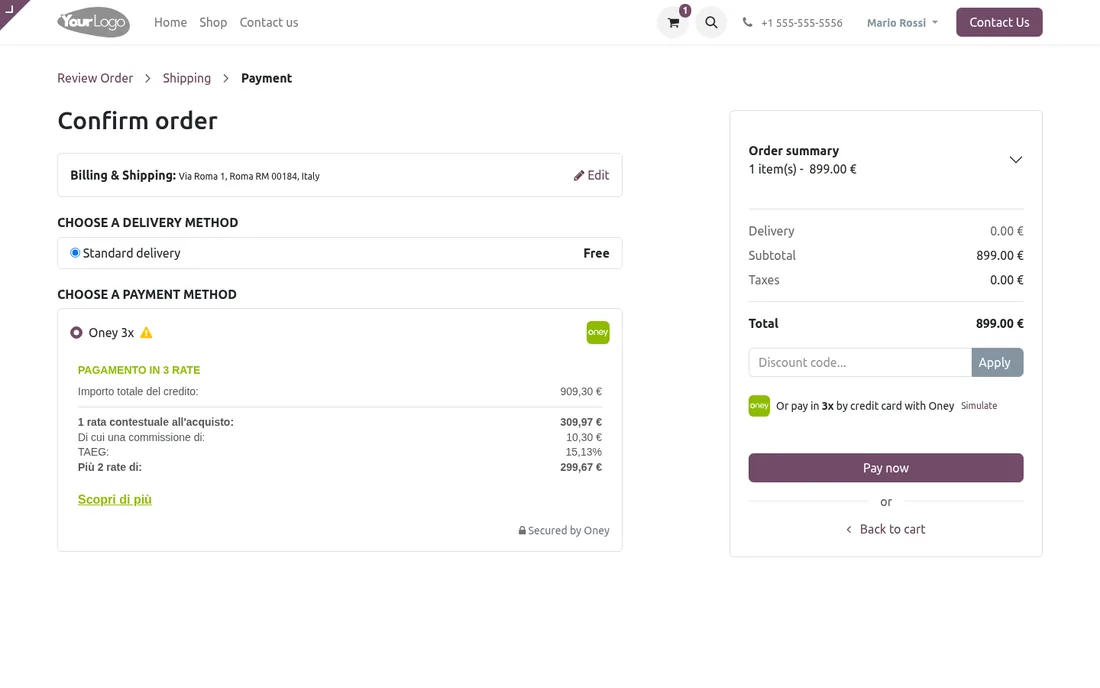
Oney 3x widget with schedule and APR on the Odoo checkout page

The official Oney widget at checkout

Under the chosen offer, Oney shows the schedule, the APR and its legal notice. The customer clicks Pay and completes the request at Oney.

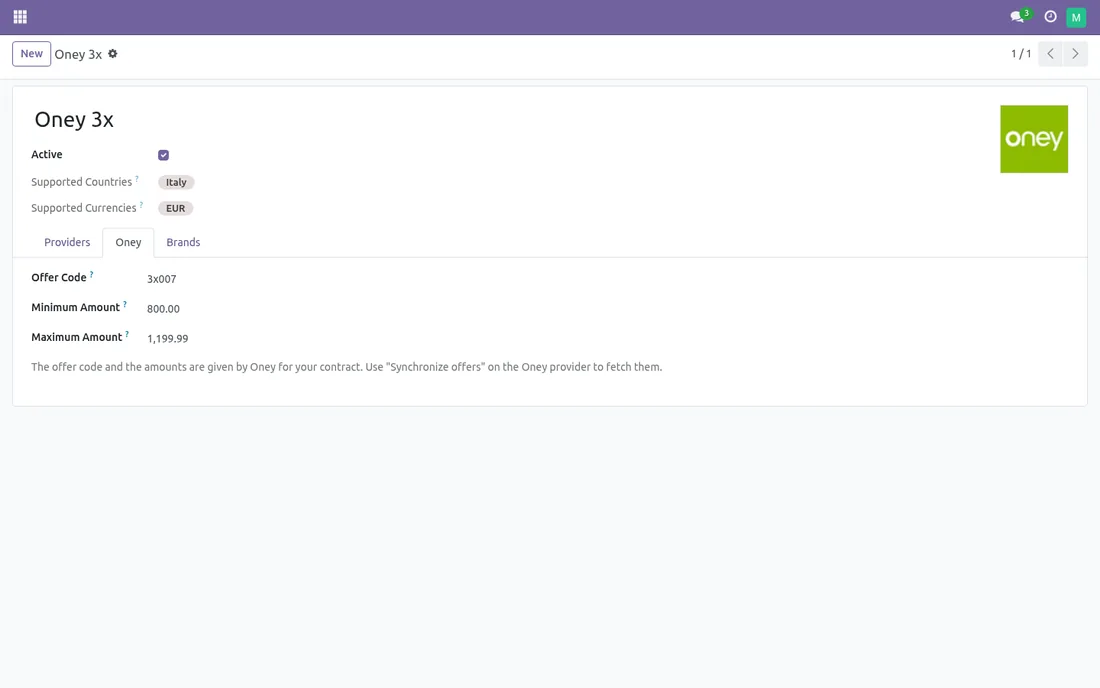
Offer code and minimum and maximum amounts of the Oney 3x payment method in Odoo

One Oney offer per payment method

Oney 3x and Oney 4x each hold the offer code and the minimum and maximum amounts of your contract, synchronized in one click.

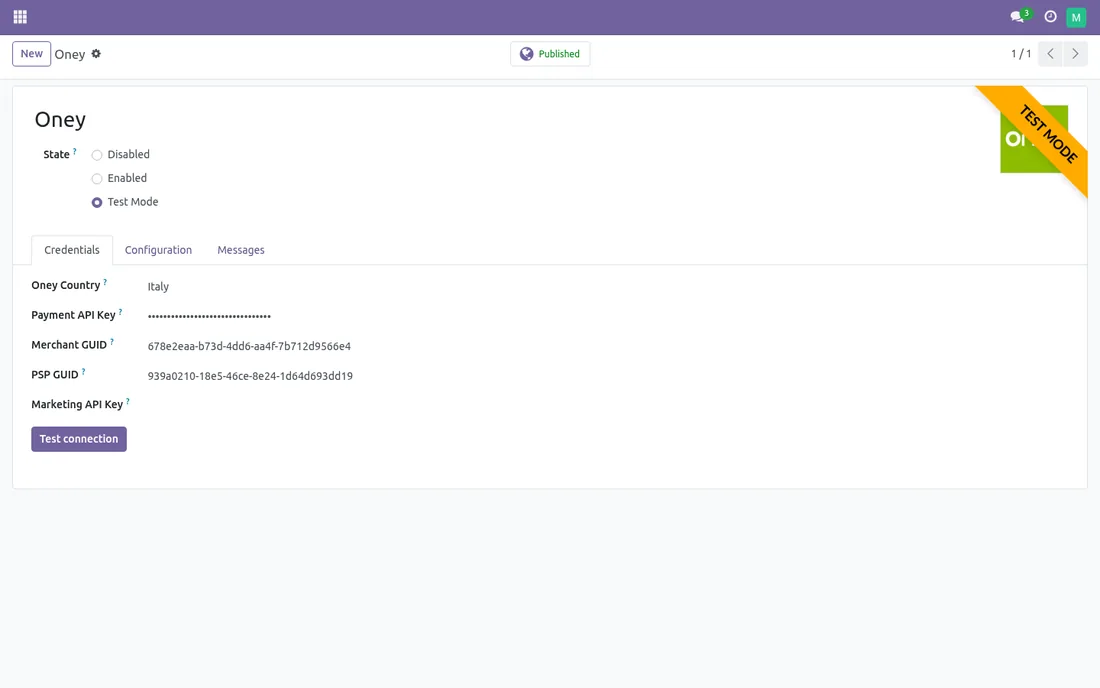
Oney payment provider in test mode in Odoo, with the contract country and the connection test

One provider per contract country

The country of the Oney contract, the credentials given by Oney and a button to test the connection before you open payments.

Before you choose

When to confirm the payment at Oney?

Once the financing is approved, the payment has to be confirmed at Oney. The module lets you choose when.

AutomaticManualOn delivery
When the payment is confirmedAs soon as Oney approvesWhen your team clicks CaptureWhen the whole order is delivered
Best forServices, goods handed over at onceChecking the order before confirming itShops that ship with Inventory
Time limitNone21 days after approval21 days after approval
Inventory appNot neededNot neededNeeded

A partial delivery does not confirm the payment: the module waits for the last delivery, or tells you once in the order when there is no backorder.

Getting started

What to ask Oney before installing the module

Oney opens one contract per country. Ask your Oney contact for these items for each country you sell in, for test and then production.

  • The payment credentials: the payment key, the Merchant GUID and the PSP GUID for your country.
  • The Marketing key: it imports your offer codes and amounts in one click, with nothing to copy by hand.
  • The offers of your contract: 3x, 4x or both, with their minimum and maximum amounts.
  • Your ORIAS number: in France, it appears in the Oney legal notice as credit intermediary.
  • A website on HTTPS: Oney requires it, and the module blocks the payment on an address that is not secure.

Oney only finances individuals who live in the country of the contract and give a mobile number from that country. Ask for the mobile number in your checkout: without it, the customer cannot pay with Oney.

With the module

An Odoo agency behind the module

Buying the module is the first step. We can take care of the rest with you.

Installation and setup

We install the module on your database, enter your credentials and test the whole flow before going live.

Support by its developers

Questions and fixes are handled by the team that wrote the module, not by a ticket relay.

Odoo support

Tailored adaptations

Specific rules for your business go in a separate module, so updates stay simple.

Odoo development
Setup

Put the module into service in four steps

  1. Buy it on the Odoo Store

    The licence is sold by Odoo; the module is then available for your database.

  2. Install it

    On Odoo.sh or on your own server, like any Odoo module.

  3. Configure it

    Enter the credentials of your provider and choose the options you need.

  4. Test, then go live

    Validate the whole flow in test mode, then switch to production.

Oney for Odoo: Pay in 3 or 4 Instalments by Card, from Checkout to Delivery

Let your customers pay in 3 or 4 instalments by card with Oney, straight from Odoo. What the customer sees, capture on delivery, refunds, countries covered and setup of our new module.

Read the article
Questions about Oney 3x 4x Split Payment

Why does a customer not see Oney at checkout?

Oney is only offered when the amount is within the limits of the offer, the customer is an individual and lives in the country of your Oney contract. Customers in the French overseas departments and territories count as French customers.

How to sell with Oney in several countries?

Duplicate the Oney provider and set the country and credentials of each contract. Each provider only offers the Oney plans of its country, in its currency: the euro, or the leu for Romania.

What does Oney learn about the delivery?

The module sends Oney the delivery mode of the order: home delivery, pickup point or store pickup. As in the official Oney modules, the address of the pickup point or store comes with the request.

Does the Oney module work for invoice payments?

Yes. Customers can pay in 3 or 4 installments from the shop, a payment link, a quotation with a down payment or an invoice in their customer portal. For an invoice already partly paid, the offer is based on the amount still due.

Does the module work on Odoo Online?

No: Odoo Online does not accept third-party modules. It installs on Odoo.sh or on your own Odoo server.

Can you install and configure it for us?

Yes. We install the module, configure it with your credentials, test it in test mode and switch to production with you.

Ask for an installation

Who supports the module?

The DevTalents team that developed it: fixes, compatibility with new Odoo versions and configuration questions.

Can the module be adapted to our needs?

Yes. We add the rules specific to your business in a separate module, so that updates stay simple.

Odoo development

Same category

Similar Odoo modules

Alma Payment Provider - Odoo module

Payment Providers

Alma Payment Provider

Alma official partner: let your customers pay in 1x–12x installments. Eligibility widget, category exclusion and Alma-approved integration.

Alma POS - Odoo module

Payment Providers

Alma POS

Alma in the Odoo Point of Sale: your customers pay in store now or in 2 to 12 instalments, on their phone. QR code on the cashier and customer display, SMS link or payment on the store's screen, order validated as soon as the customer has paid, refunds from the POS.

All our Odoo modules

A module to adapt or to create?

Tell us what you need: we reply within 48 hours.

Discuss your project
Billy, the DevTalents mascot, answering a message on his phone