
DevTalents

Mondu for Odoo: B2B Pay by Invoice and Instalments

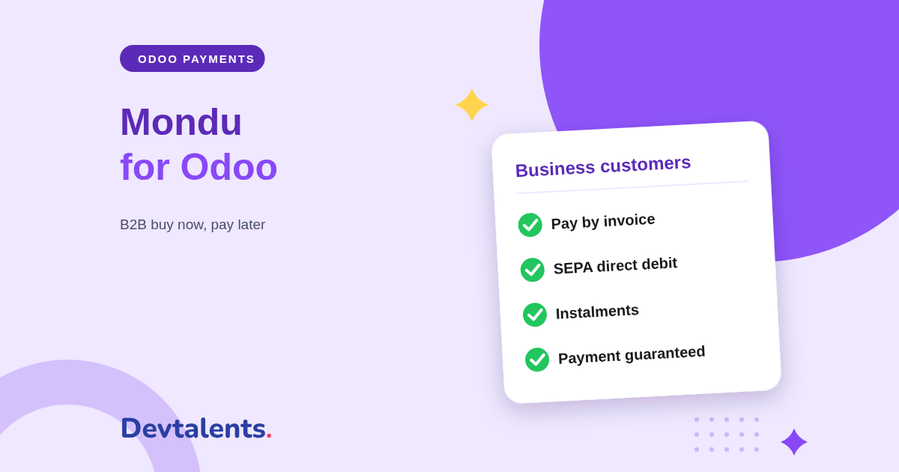
Mondu in Odoo for business customers: pay by invoice at 14, 30, 60 or 90 days, by SEPA direct debit or in instalments, with the payment guaranteed by Mondu.

  • #BNPL
  • #New
  • #SEPA
  • Developed by DevTalents
  • Support by the team that wrote it
  • Installation on request
  • Odoo 17.0
  • Odoo 18.0
  • Odoo 19.0
  • Odoo 20.0
Billy, the DevTalents mascot, presenting the Odoo module

What the module does

  • Pay later by invoice

    Your business customer orders now and pays by bank transfer at the term agreed with Mondu, while Mondu pays you.

  • SEPA direct debit and instalments

    Pay later by direct debit, instalments by direct debit or bank transfer, and instant bank transfer, depending on your Mondu contract and the buyer's country.

  • Payment guaranteed by Mondu

    Mondu checks and approves the buyer at checkout and carries the risk of non-payment: a late payer does not change your cash flow.

  • The Odoo invoice goes to Mondu

    Posting the customer invoice in Odoo sends it to Mondu and starts the payout; an order invoiced in several shipments sends each invoice.

  • Mondu notice on the invoice

    The invoice PDF prints Mondu's legal notice, Mondu's bank account and the payment term in the customer's language, and hides your own IBAN.

  • Refunds by credit note

    A credit note in Odoo refunds the buyer through Mondu, in full or in part, without opening the Mondu merchant portal.

  • Only for business customers

    Mondu is offered to companies only, in euro and pound sterling, where Mondu operates: Germany, Austria, France, the Netherlands, the United Kingdom and more.

  • Pay on account

    Your regular customers open a Mondu account from the Odoo customer portal and pay their orders on a monthly statement.

  • Every Odoo payment page

    eCommerce checkout, quotations and invoices in the customer portal, with or without the Website app, and payment links for the full amount or part of it.

In pictures

The Mondu module in Odoo, screen by screen

Real screenshots of the module, tested on the Mondu test environment in euro and pound sterling, from the payment choice to the invoice sent to your business customer.

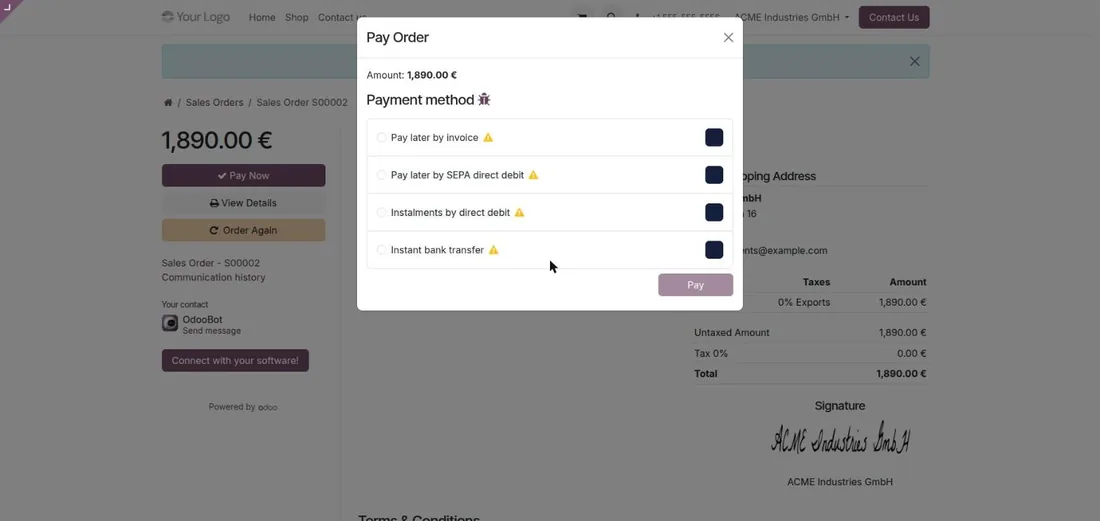
The Mondu payment methods on an Odoo order: invoice, SEPA, instalments, instant bank transfer

Choosing Mondu at the payment step

On the shop, a quotation, an invoice or a payment link, your business customer sees the Mondu methods of your contract: pay by invoice, SEPA direct debit, instalments, instant bank transfer.

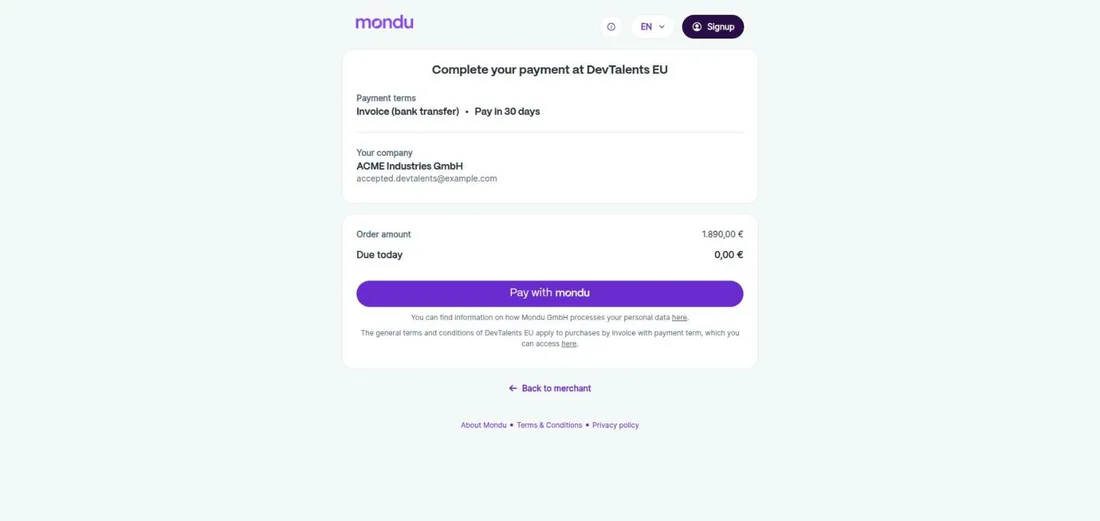
Mondu secure payment page for an Odoo order: pay by invoice in 30 days

Mondu's secure page

The customer confirms on Mondu's page, with the payment term shown. Nothing to enter on your side: Mondu checks the company and guarantees the payment.

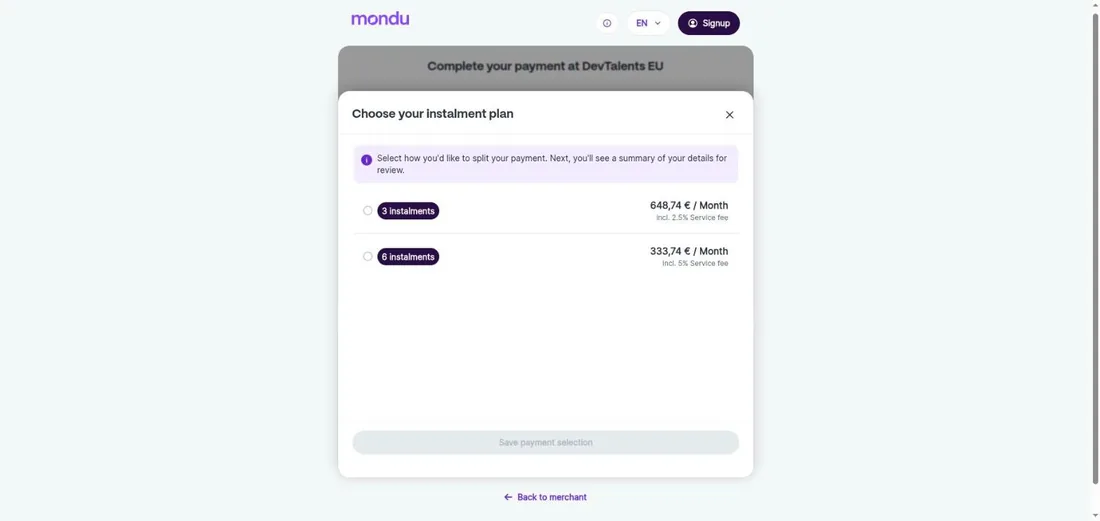
Choosing a Mondu instalment plan for an Odoo order

Paying in instalments

For instalments, the customer picks a plan, for example 3 or 6 monthly payments, and sees any fee before confirming.

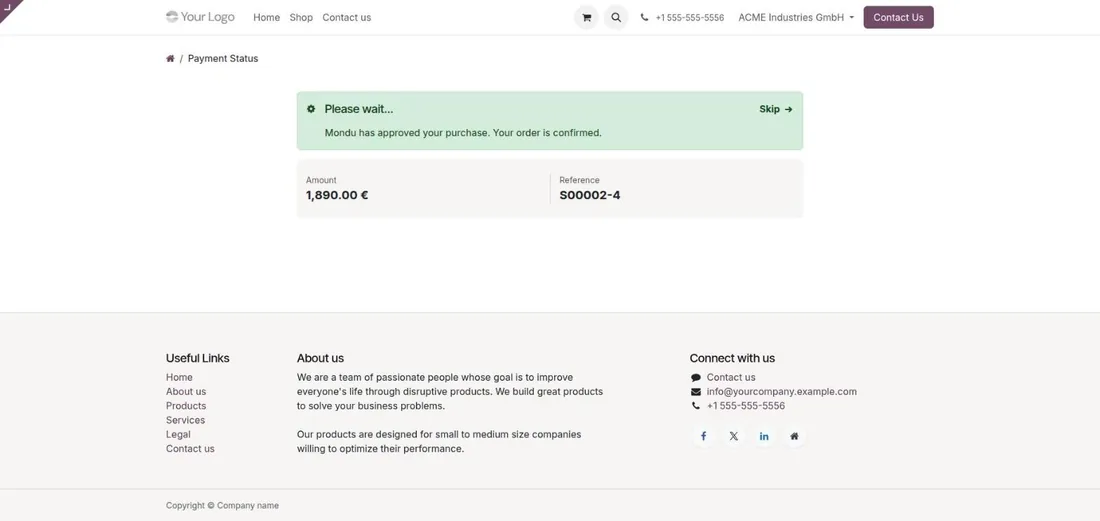
Odoo payment status page: Mondu approved the purchase and the order is confirmed

The order approved in real time

As soon as Mondu approves the purchase, the customer returns to your site and the order is confirmed in Odoo, ready to ship and invoice.

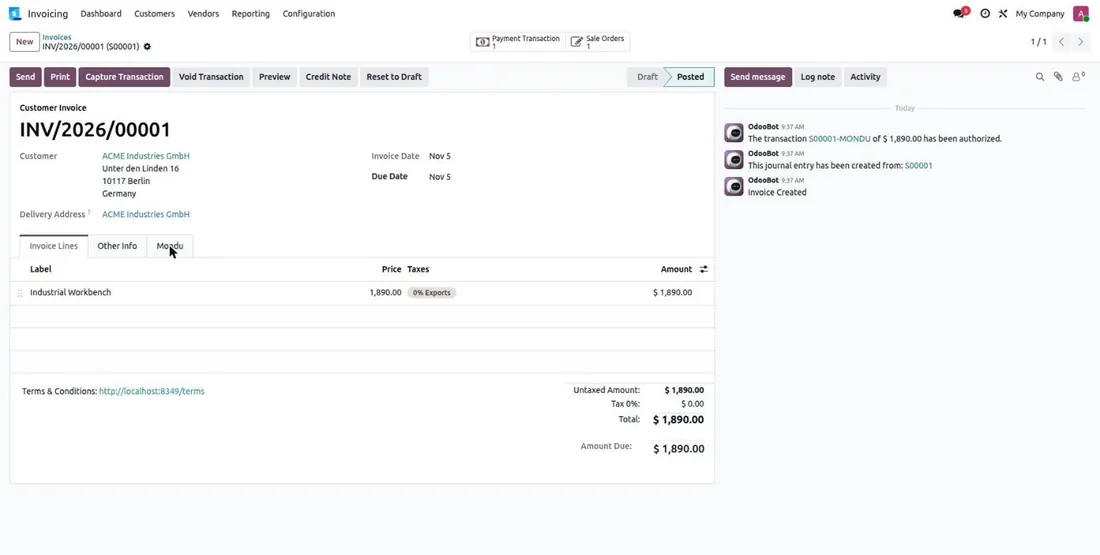
Odoo customer invoice linked to an approved Mondu order, with the payment history

The Mondu order on the invoice

When the customer pays with Mondu, the order is approved and linked to the invoice. Posting the invoice sends it to Mondu and starts your payout.

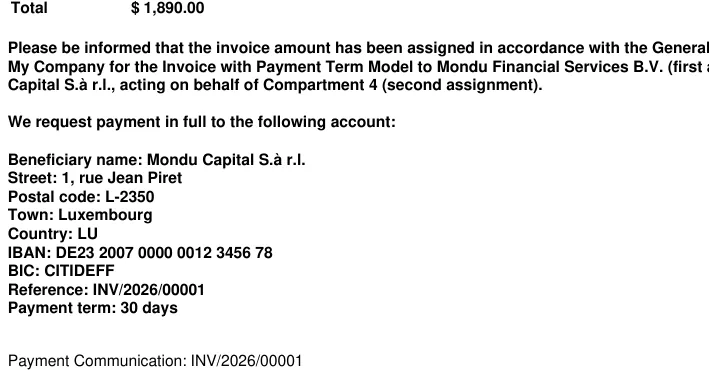
Odoo invoice PDF with the Mondu legal notice, the Mondu bank account and a 30 day payment term

The Mondu notice on the invoice PDF

The invoice prints Mondu's legal notice, Mondu's bank account and the payment term, in the customer's language. Your own IBAN is hidden.

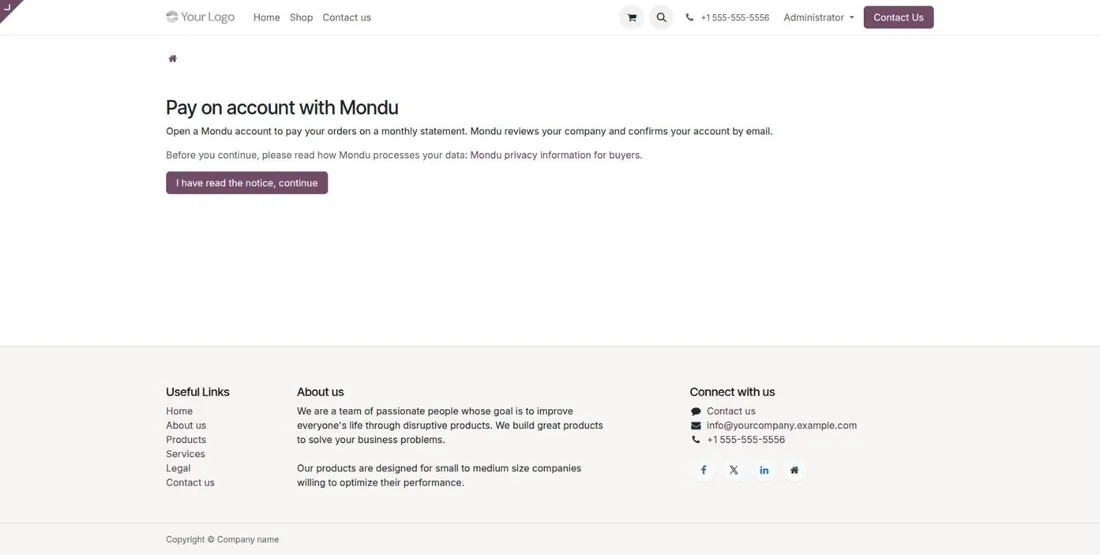
Odoo customer portal page to open a Mondu account and pay on a monthly statement

Pay on account from the customer portal

Your regular customers open a Mondu account from the Odoo portal and pay their orders on a monthly statement.

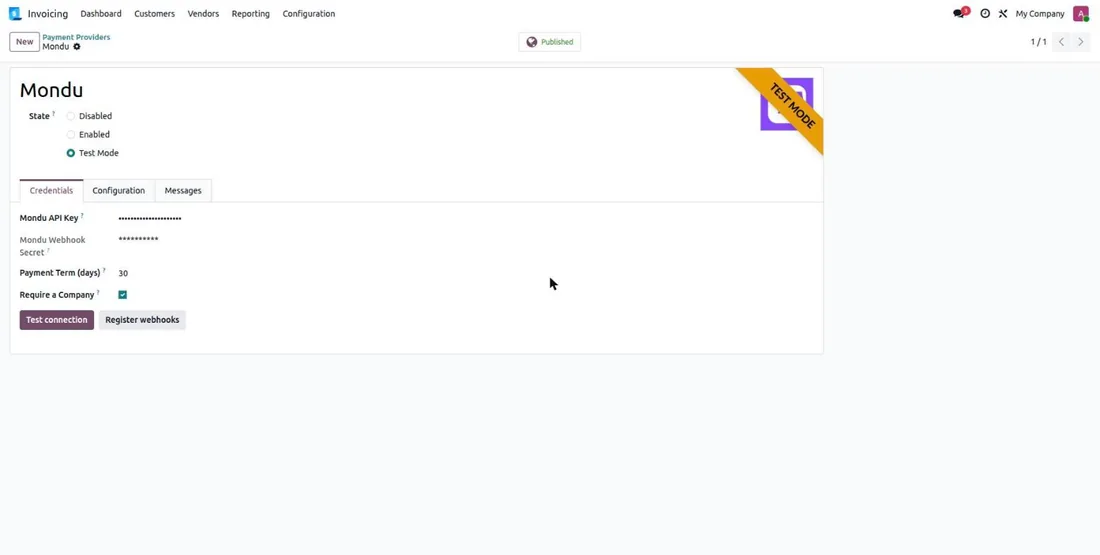
Mondu payment provider settings in Odoo: access, payment term and business customers only

A short setup

Your Mondu access, the default payment term, and whether Mondu is only offered to customers with a company name.

Before you choose

Pay by invoice with Mondu or classic payment terms?

Either way, your business customer pays later. The difference is on your side.

With Mondu (this module)Classic payment terms
When you get paidWhen you send the invoice, as set in your Mondu contractWhen the customer pays, at the due date or later
Risk of non-paymentCarried by Mondu, once the buyer is approvedCarried by you
Buyer checkDone by Mondu during the orderUp to you
Payment remindersHandled by MonduHandled by your team
In OdooThe posted invoice goes to Mondu, a credit note refunds the buyerDue dates and reminders followed by hand

Selling to private customers? Split payments then go through Oney or Alma.

The journey

From checkout to payout: Mondu B2B buy now, pay later in four steps

1

The customer picks Mondu

On your shop, a quotation, an invoice or a payment link, they choose pay by invoice, SEPA direct debit or instalments.

2

Mondu approves the company

On Mondu's secure page, the company is checked. Once approved, the order is confirmed in Odoo.

3

You ship and invoice

You post the invoice in Odoo, at once or with each delivery: it goes to Mondu, which pays you.

4

The customer pays Mondu

At the 14, 30, 60 or 90 day due date, the customer pays Mondu, which handles the reminders.

Getting started

What to ask Mondu before installing the module

Mondu opens merchant accounts on request: plan these points with them.

  • A test access: to try the whole journey on the Mondu test environment.
  • The payment methods of your contract: invoice, SEPA direct debit, instalments, instant bank transfer, pay on account.
  • The payment terms available: 14, 30, 60 or 90 days; the default one is set in Odoo.
  • The countries and currencies of your customers: euro for Europe, pound sterling for the United Kingdom.
  • The live access: Mondu issues it after reviewing your integration.

Watch out: your customers must pay Mondu, not you. The module prints Mondu's bank details on the invoice and hides yours; check that no other invoice layout shows your IBAN again.

With the module

An Odoo agency behind the module

Buying the module is the first step. We can take care of the rest with you.

Installation and setup

We install the module on your database, enter your credentials and test the whole flow before going live.

Support by its developers

Questions and fixes are handled by the team that wrote the module, not by a ticket relay.

Odoo support

Tailored adaptations

Specific rules for your business go in a separate module, so updates stay simple.

Odoo development
Setup

Put the module into service in four steps

  1. Buy it on the Odoo Store

    The licence is sold by Odoo; the module is then available for your database.

  2. Install it

    On Odoo.sh or on your own server, like any Odoo module.

  3. Configure it

    Enter the credentials of your provider and choose the options you need.

  4. Test, then go live

    Validate the whole flow in test mode, then switch to production.

Mondu Odoo Integration: B2B Pay by Invoice and Instalments

Our new Mondu module brings B2B buy now, pay later to Odoo: pay by invoice, SEPA or instalments for your business customers, what your team does from Odoo and how to get started.

Read the article


Questions about Mondu Payment Provider

What happens if Mondu declines the customer's company?

The order is not confirmed with Mondu: the customer comes back to your website with a message explaining it, and can pay the order with another payment method.

Do private customers see Mondu?

No. The module only offers Mondu to business customers, and you can limit it to customers with a company name.

Can I invoice a Mondu order in several parts?

Yes. Each invoice posted in Odoo is sent to Mondu, up to the amount of the order, for example with each delivery.

How do I refund a customer who paid with Mondu?

With a credit note in Odoo, in full or in part: Mondu lowers what the buyer owes, without opening the Mondu merchant portal.

Which countries does Mondu work in?

For business buyers in many European countries, including Germany, Austria, France, Belgium and the Netherlands, in euro, and in the United Kingdom in pound sterling.

Which Odoo versions does Mondu Payment Provider support?

The module is published for Odoo 17.0, 18.0, 19.0, 20.0. For another version, we can port it: tell us which one.

Does the module work on Odoo Online?

No: Odoo Online does not accept third-party modules. It installs on Odoo.sh or on your own Odoo server.

Can you install and configure it for us?

Yes. We install the module, configure it with your credentials, test it in test mode and switch to production with you.

Ask for an installation

Who supports the module?

The DevTalents team that developed it: fixes, compatibility with new Odoo versions and configuration questions.

Can the module be adapted to our needs?

Yes. We add the rules specific to your business in a separate module, so that updates stay simple.

Odoo development

Same category

Similar Odoo modules

Alma Payment Provider - Odoo module

Payment Providers

Alma Payment Provider

Alma official partner: let your customers pay in 1x–12x installments. Eligibility widget, category exclusion and Alma-approved integration.

Alma POS - Odoo module

Payment Providers

Alma POS

Alma in the Odoo Point of Sale: your customers pay in store now or in 2 to 12 instalments, on their phone. QR code on the cashier and customer display, SMS link or payment on the store's screen, order validated as soon as the customer has paid, refunds from the POS.

All our Odoo modules

A module to adapt or to create?

Tell us what you need: we reply within 48 hours.

Discuss your project
Billy, the DevTalents mascot, answering a message on his phone