


Payment Providers
Alma Payment Provider
Alma official partner: let your customers pay in 1x–12x installments. Eligibility widget, category exclusion and Alma-approved integration.

Odoo backend payment by phone or mail order with Moneris: your team charges the customer's card from the invoice or the sales order, in secure Moneris card fields.
For more details on the module, see its page on the Odoo Apps Store

A Pay by Card (Phone / Mail) button on posted invoices, quotations and sales orders: type the card the customer reads to you and charge it. Tested on the Moneris sandbox.
The card number, expiry date and security code are typed in fields hosted by Moneris and go straight to Moneris: nothing is kept in your Odoo database.
Take a down payment on a quotation, an installment or the balance of an invoice, never more than the amount due. Odoo confirms the quotation and marks the invoice paid by itself.
Charge a card the customer saved before, save the new card after reading the agreement text to the customer, or save a card without charging it. Tested on the Moneris sandbox.
Moneris receives every payment, card check and refund as a mail or telephone order, the right type for a card taken by phone.
Refund from the accounting payment, in full or in part, or authorize now and capture at delivery. Tested on the Moneris sandbox.
Each transaction keeps the channel, phone or mail, the user who took it and the customer's agreement to save the card, also written in the chatter.
A dedicated access right decides who can take card payments in the back office. Each company of your database keeps its own Moneris account and its own saved cards.
A double click, or a second payment of the same document started a few minutes earlier, is stopped before the card is charged again.
Every screenshot is real: taken on Odoo Enterprise, with real payments sent to the Moneris test platform. Each result was read back at Moneris, where the payment is recorded as a mail or telephone order.
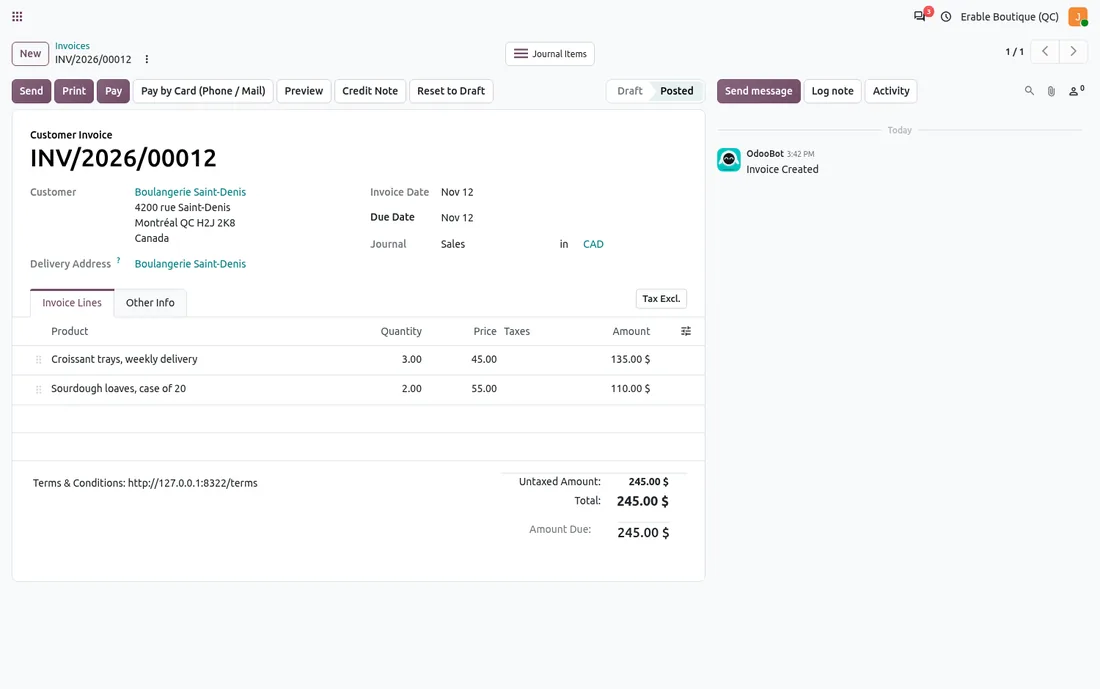
The customer calls to pay an invoice: the Pay by Card (Phone / Mail) button sits on the posted invoice, next to the usual buttons.
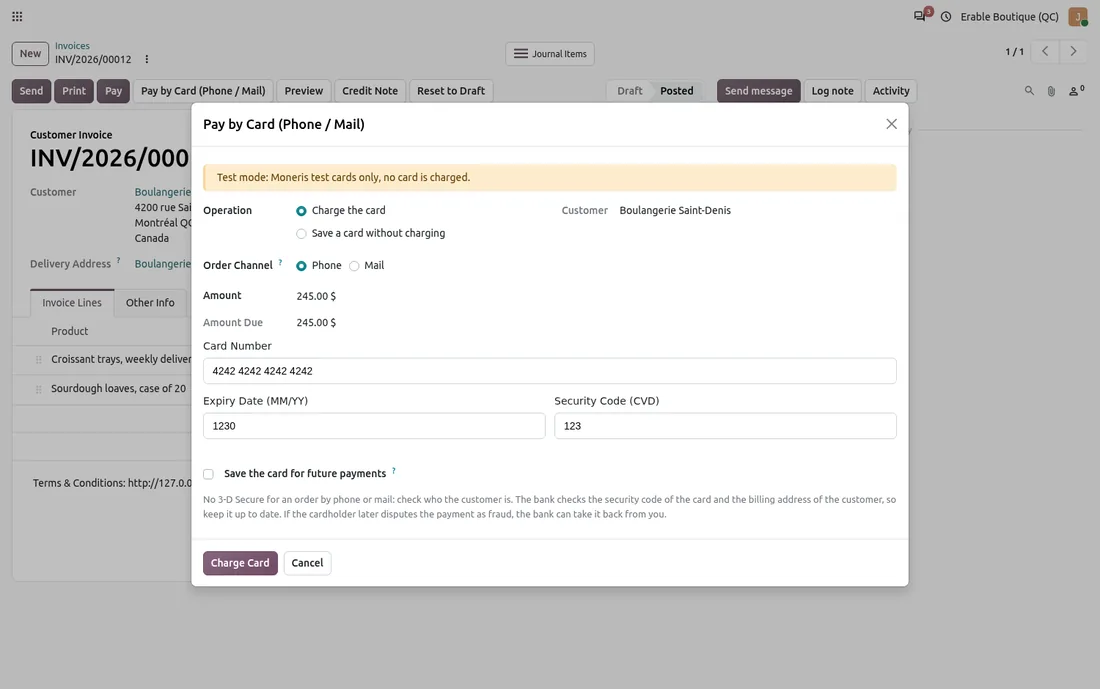
Your agent types the card the customer reads out. The fields are hosted by Moneris: the card number never goes through Odoo.
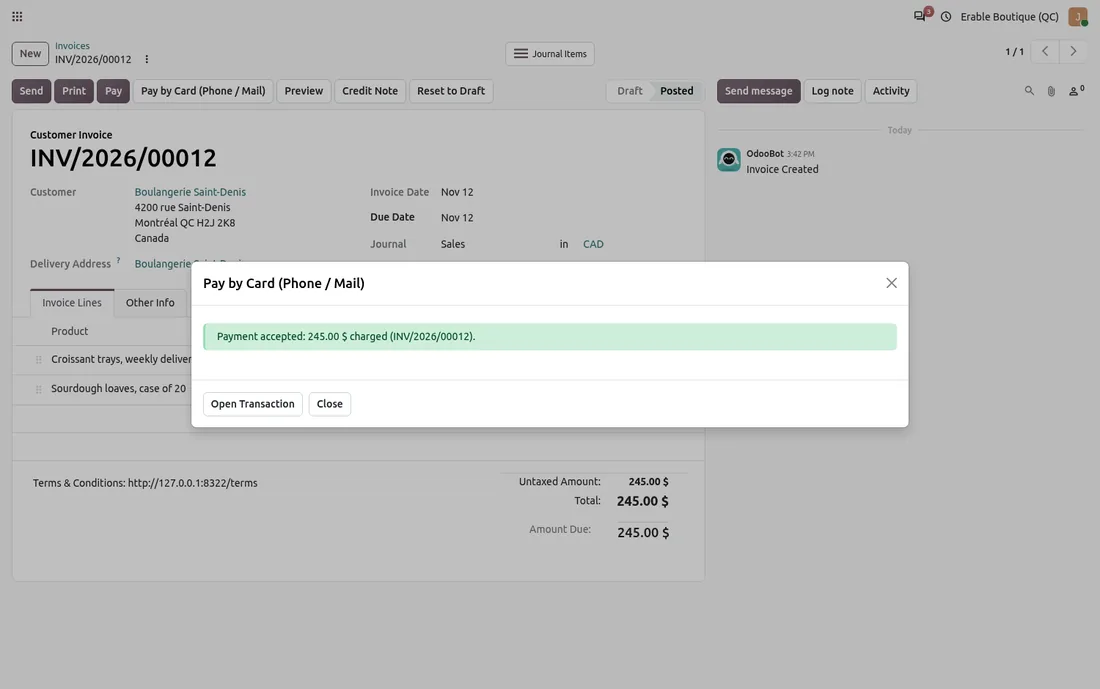
Moneris answers while the customer is still on the phone, so you can confirm the payment right away.
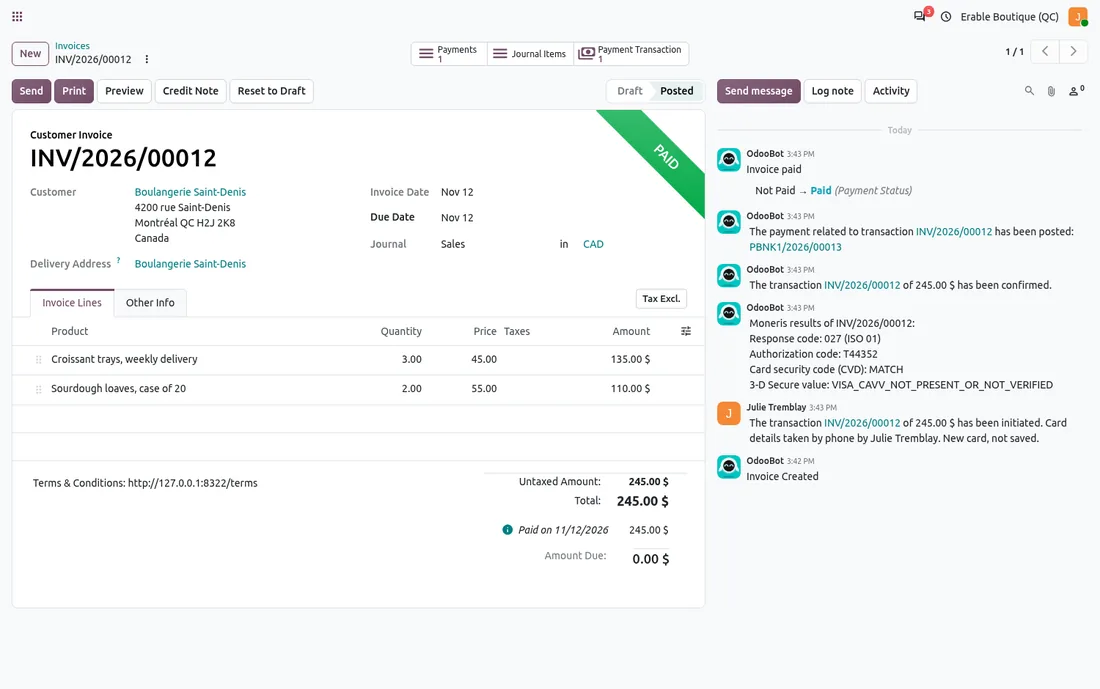
The accounting payment is created and reconciled. The chatter keeps a message signed by the agent, with the channel and the Moneris answer.
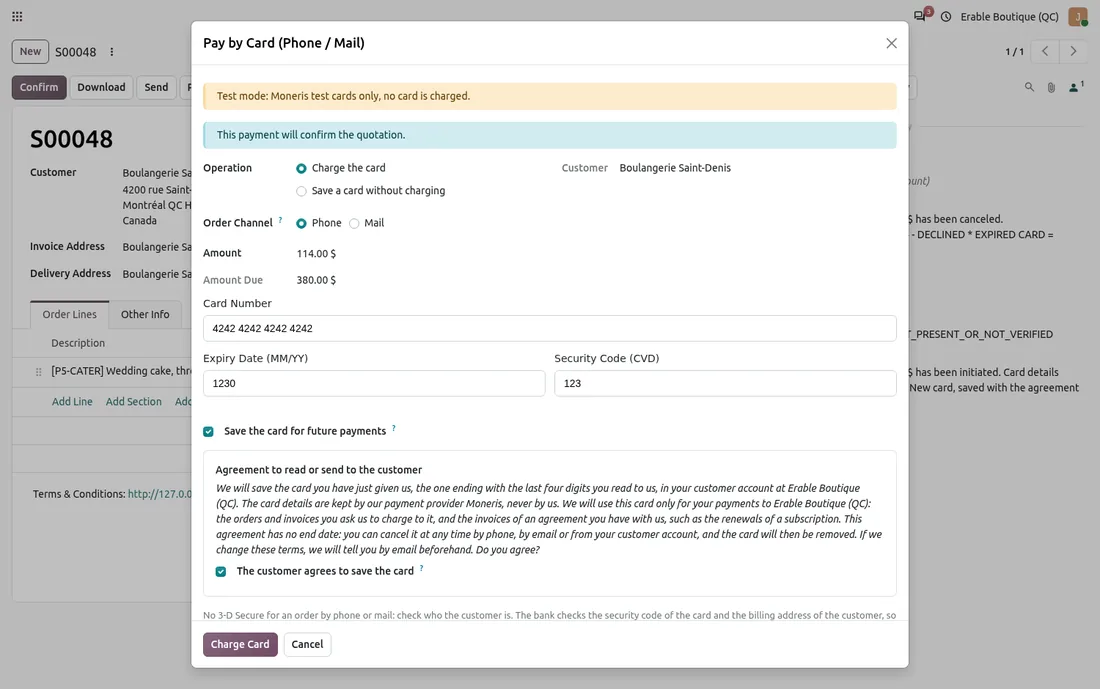
A down payment confirms the quotation. To keep the card, the agent reads the agreement text to the customer and ticks the box: without it, nothing is saved.
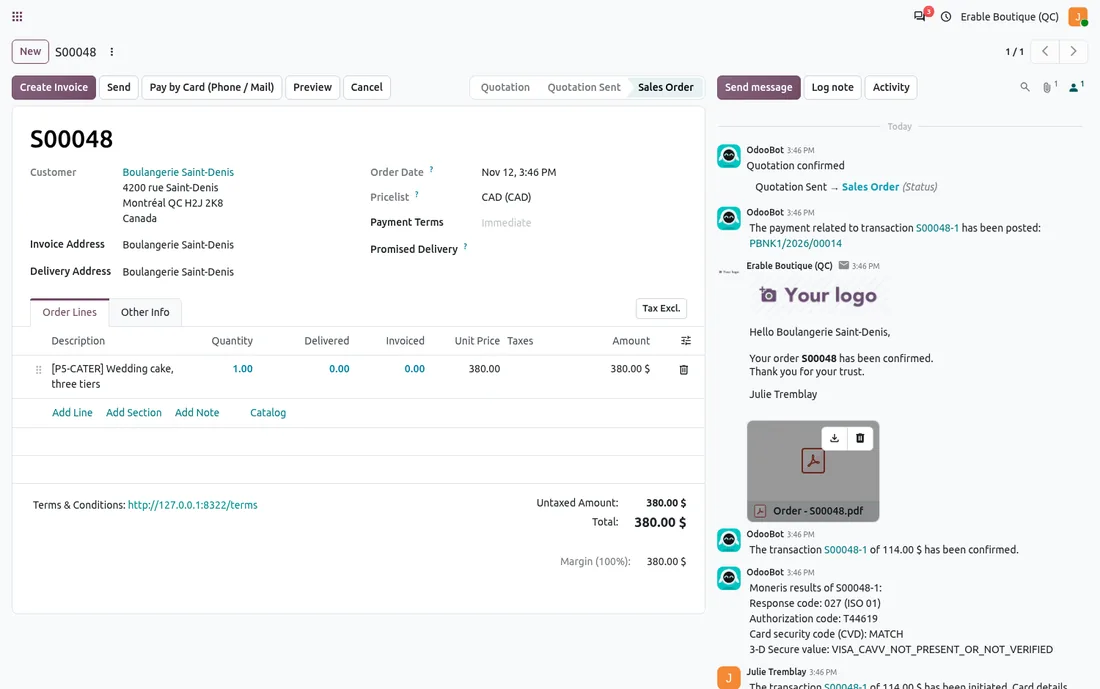
As soon as the down payment reaches the requested amount, Odoo confirms the quotation, as for an online payment.
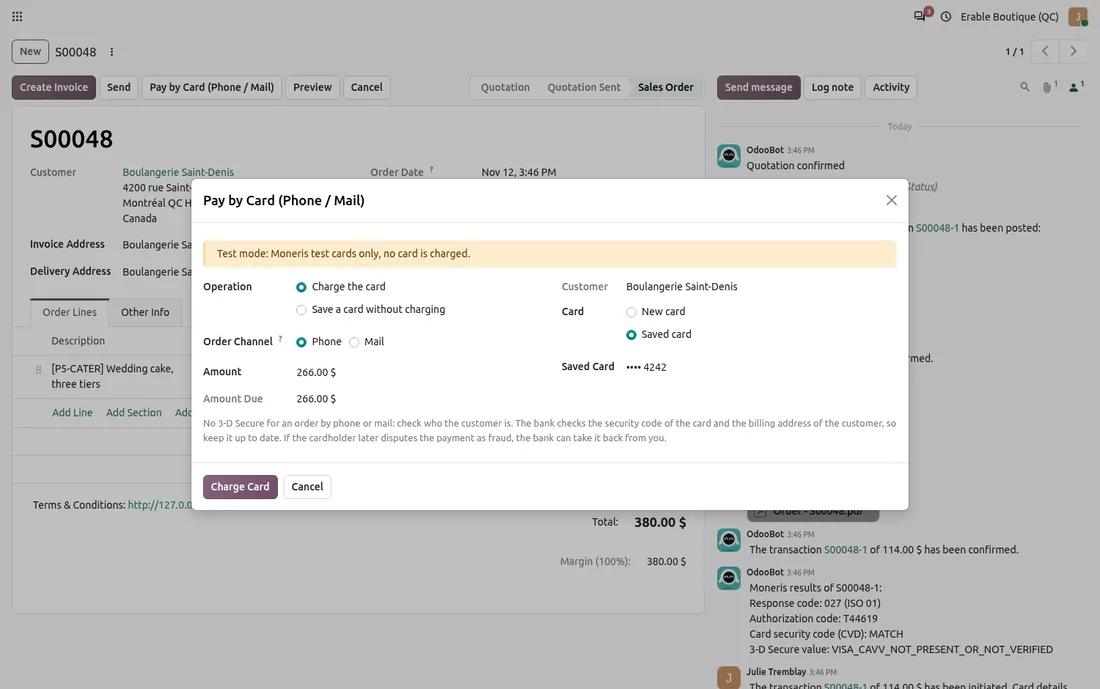
For the next order or the balance, the agent picks the customer's card: nothing to read out again.
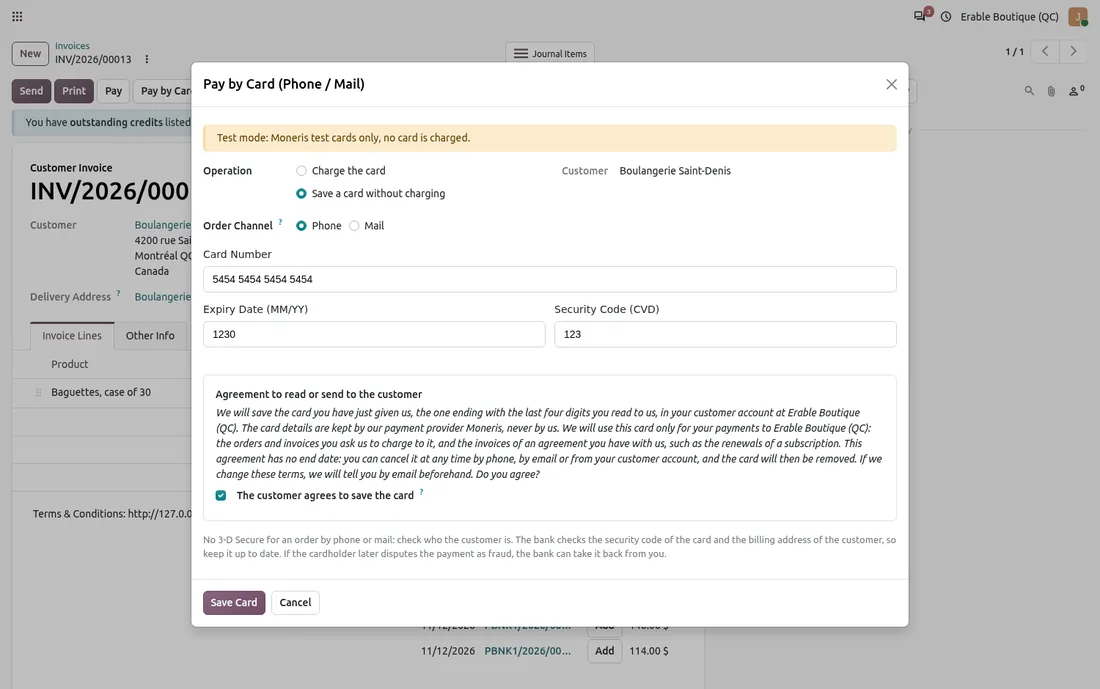
Moneris checks the card with no charge, and Odoo keeps it for the customer's next orders.
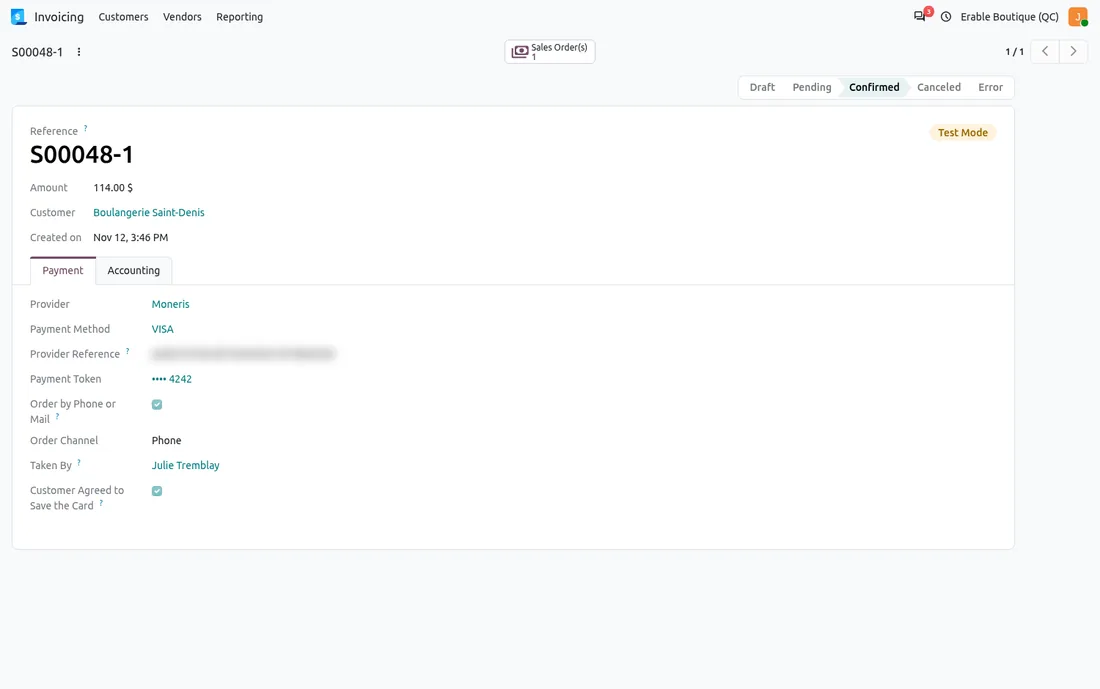
The transaction keeps the channel, phone or mail, the user who took it and the customer's agreement for the card.
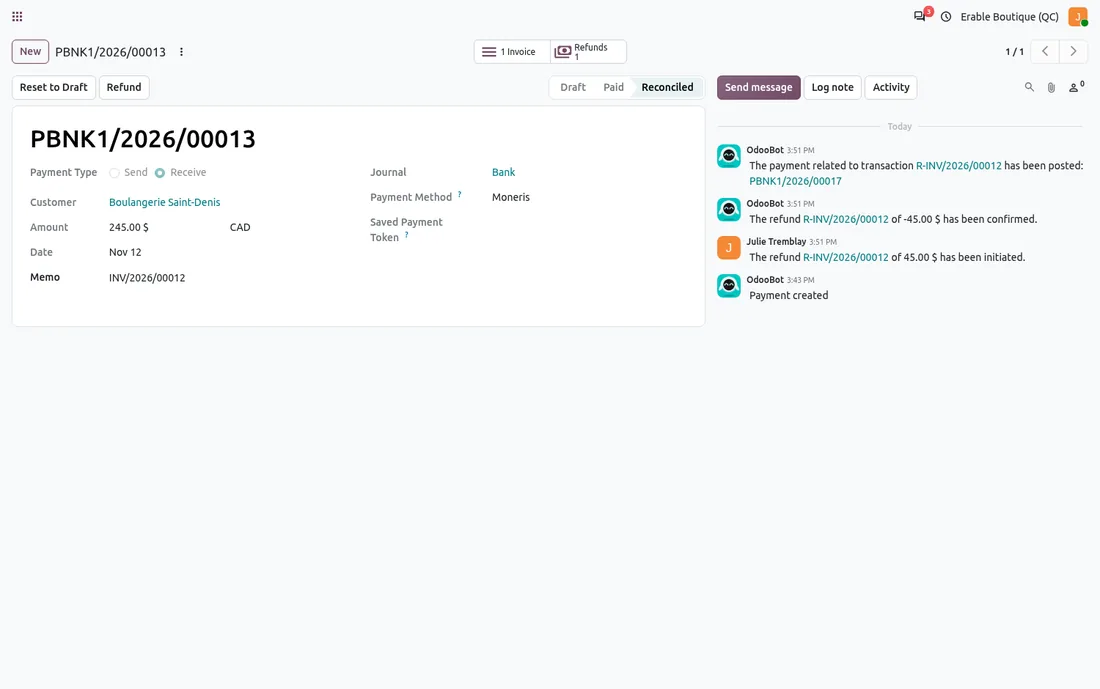
Refund in full or in part from the accounting payment. At Moneris, the refund keeps the mail or telephone order type.
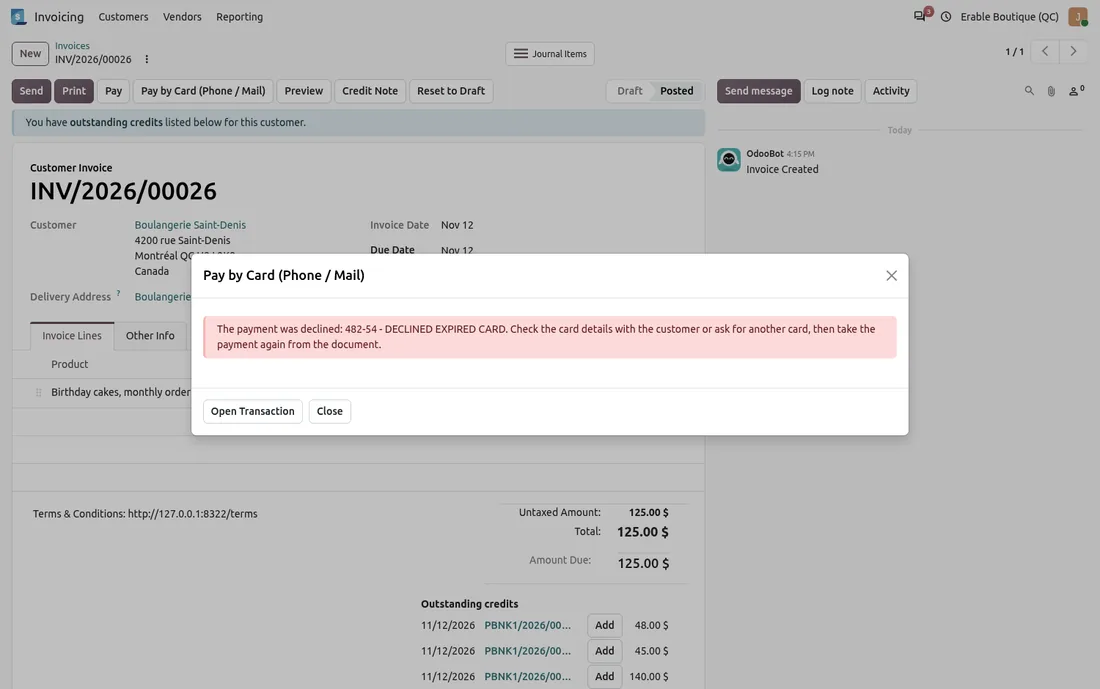
The bank declines? The agent reads the reason and can offer another card at once. The invoice does not change.
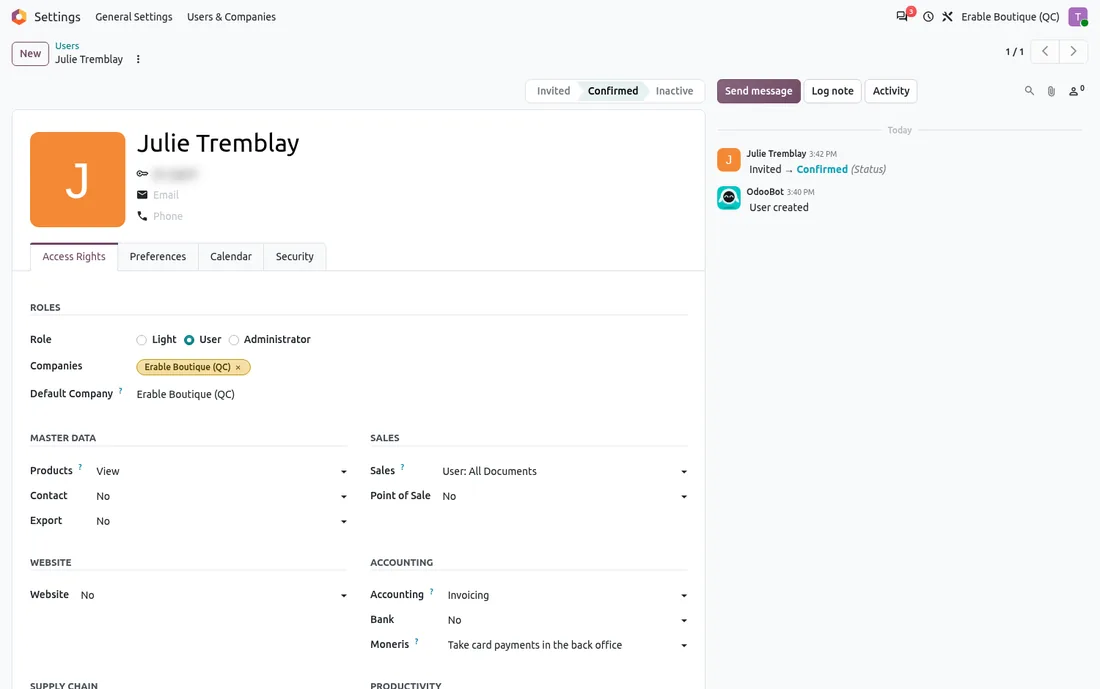
You choose who can take card payments in the back office. Other users do not see the button.
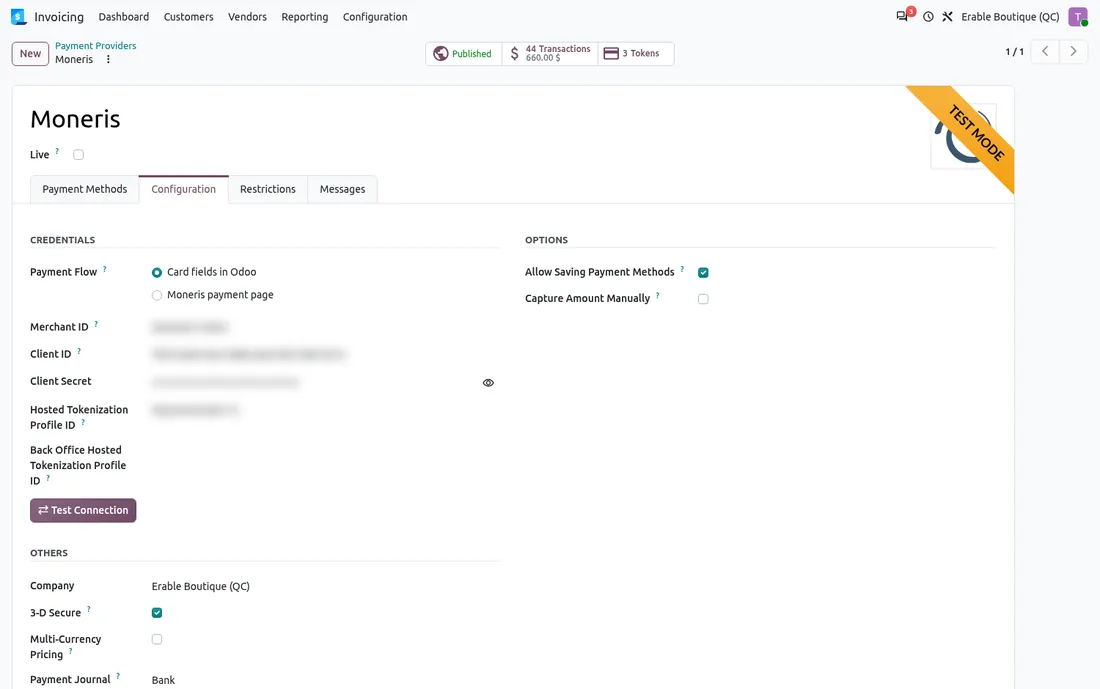
The module uses your existing Moneris setup. A second profile can be entered if the back office is not on your website's domain.
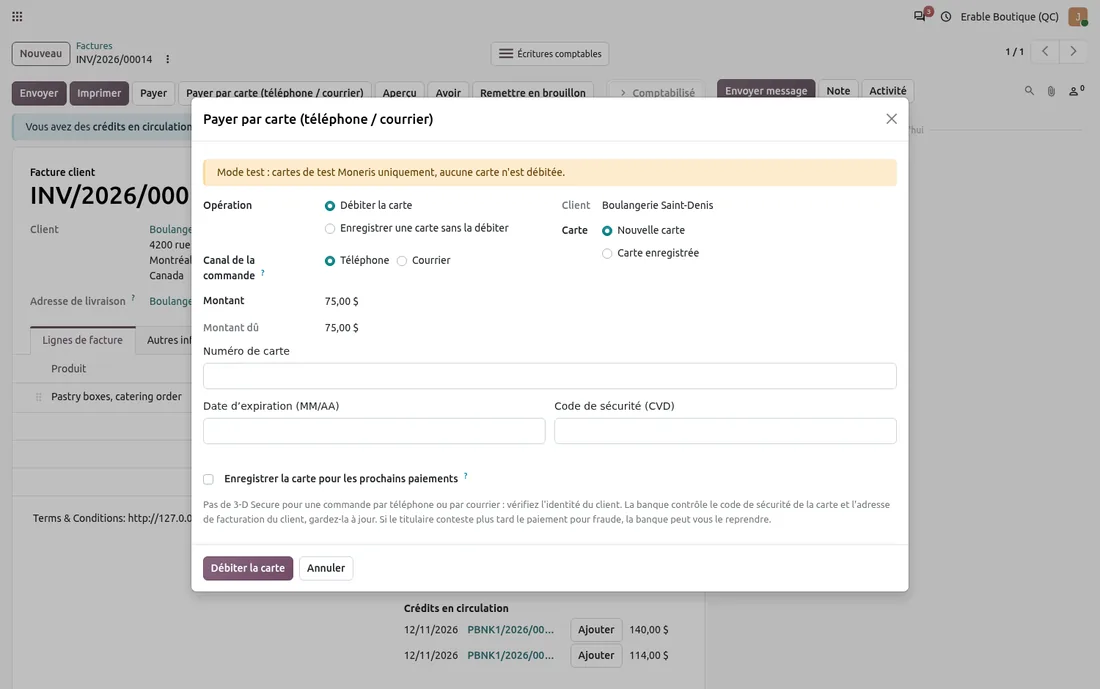
The window, the Moneris card fields and the messages follow the language of the user.
Your team stays in Odoo and opens no separate virtual terminal.
Click Pay by Card (Phone / Mail). The amount due is filled in; lower it for a down payment or an installment.
A card the customer saved before, or a new card they read out to you. To save it, read them the agreement text and tick the box.
Moneris answers in a few seconds. If the card is declined, the reason shows and you can try another card.
Invoice paid and reconciled, quotation confirmed when the down payment is reached, automatic invoicing if you use it, signed message in the chatter.
With our Moneris Payment Provider module, you can also send a payment link. The two work together.
| Phone payment (this module) | Payment link | |
|---|---|---|
| Who types the card | Your agent, during the call | The customer, on their computer or phone |
| When you get paid | During the call | When the customer opens the link and pays |
| 3-D Secure | No: the customer is not on the page to answer their bank | Yes, when the bank asks for it |
| If the payment is disputed as fraud | The bank can take the payment back from the merchant | 3-D Secure protection applies |
| Best for | Known customers, orders taken by phone or received by mail | Customers who prefer to pay themselves |
For a new customer you do not know, the payment link stays the safer choice. Phone payment is for customers who call you and those who mail you an order form.
The module adds to our Moneris module for Odoo: it uses the same account and settings.
To see phone payments on your own invoices, ask for a demo.
Buying the module is the first step. We can take care of the rest with you.
We install the module on your database, enter your credentials and test the whole flow before going live.
Questions and fixes are handled by the team that wrote the module, not by a ticket relay.
Odoo supportSpecific rules for your business go in a separate module, so updates stay simple.
Odoo developmentThe licence is sold by Odoo; the module is then available for your database.
On Odoo.sh or on your own server, like any Odoo module.
Enter the credentials of your provider and choose the options you need.
Validate the whole flow in test mode, then switch to production.
No. Your agent types the card in fields hosted by Moneris, shown inside the Odoo window. The number, expiry date and security code go straight to Moneris: Odoo only receives a single-use reference, never stored.
The 3-D Secure code is sent to the cardholder, who is not in front of the page. Moneris therefore receives the payment as a mail or telephone order. The bank still checks the card security code and the customer's address, and the result is noted on the invoice or the order.
Yes, with their agreement: the window shows a text to read or send to them, and the agreement box is mandatory. The card is saved at Moneris and Odoo only keeps its last four digits. You can also save a card without charging it.
Yes. This module adds to our <a href="/odoo-apps/moneris-payment-gateway">Moneris module for Odoo</a>, which connects Odoo to your Moneris account and handles online payments, refunds and captures.
No. The usual button stays the same for your accounting team. The module adds its own button, shown only to the users allowed to take card payments.
No: Odoo Online does not accept third-party modules. It installs on Odoo.sh or on your own Odoo server.
Yes. We install the module, configure it with your credentials, test it in test mode and switch to production with you.
The DevTalents team that developed it: fixes, compatibility with new Odoo versions and configuration questions.
Yes. We add the rules specific to your business in a separate module, so that updates stay simple.
Payment Providers
Alma official partner: let your customers pay in 1x–12x installments. Eligibility widget, category exclusion and Alma-approved integration.
Payment Providers
Alma in the Odoo Point of Sale: your customers pay in store now or in 2 to 12 instalments, on their phone. QR code on the cashier and customer display, SMS link or payment on the store's screen, order validated as soon as the customer has paid, refunds from the POS.
Payment Providers
HiPay Enterprise acquirer: CB, PayPal, iDEAL, Bancontact, SEPA, Klarna, Alma, Oney, Wero and more.
Tell us what you need: we reply within 48 hours.
Discuss your project