
DevTalents

Moneris Odoo Integration: Card Payment Module

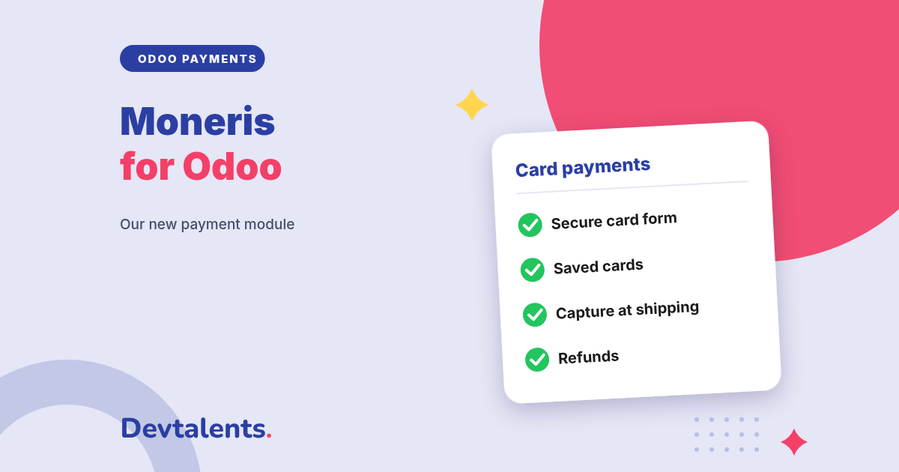
Moneris card payments in Odoo for Canadian merchants: card form hosted by Moneris on your website, or the Moneris Checkout payment page. 3-D Secure, saved cards, full or partial capture at shipping, void, full and partial refunds and subscription renewals, all from Odoo.

  • #CB / Visa / Mastercard
  • #New
  • #Tokenization
  • Developed by DevTalents
  • Support by the team that wrote it
  • Installation on request
Billy, the DevTalents mascot, presenting the Odoo module

What the module does

  • On your website or on the Moneris payment page

    Choose in Odoo where your customers pay: in a card form hosted by Moneris on your own payment page, or on the Moneris Checkout page set up in your Moneris account. Both tested on the Moneris sandbox.

  • Card form hosted by Moneris

    Card numbers are typed in a secure form provided by Moneris and never reach your Odoo database, which keeps your PCI scope to the minimum.

  • Built on the newest Moneris platform

    The module runs on Moneris' latest payment platform: requests can be repeated safely and captures can be split.

  • Saved cards

    Customers save their card for their next purchases; a card they delete in their portal is also deleted at Moneris. Tested on the Moneris sandbox.

  • Capture at shipping, in full or in part

    The card is authorized at order; you collect all or part of the amount when you ship, or release the authorization. Tested on the Moneris sandbox.

  • Full and partial refunds from Odoo

    Open the payment, click Refund and enter the amount: Moneris refunds the customer. Tested on the Moneris sandbox.

  • Subscriptions and saved card charges

    Odoo Subscriptions renewals and invoices paid by your accountant are charged to the saved card, with the indicators Visa and Mastercard require. Tested on the Moneris sandbox.

  • No double charge

    A double click never charges the card twice, and if Moneris does not answer in time, Odoo looks the payment up at Moneris instead of sending it again. A customer who closes the Moneris page after paying is found again too.

  • Payment links and customer portal

    Payment links for all or part of an invoice, quotations with a down payment and invoices in the portal, even without the Website app. 3-D Secure 2, with and without the bank code, tested on the Moneris sandbox.

Tested end to end

Every feature of the Moneris module for Odoo, tested and shown

Every screenshot is real: taken on Odoo Enterprise, with real payments sent to the Moneris test platform. One screenshot per tested feature.

Moneris card form and saved cards on the Odoo payment page

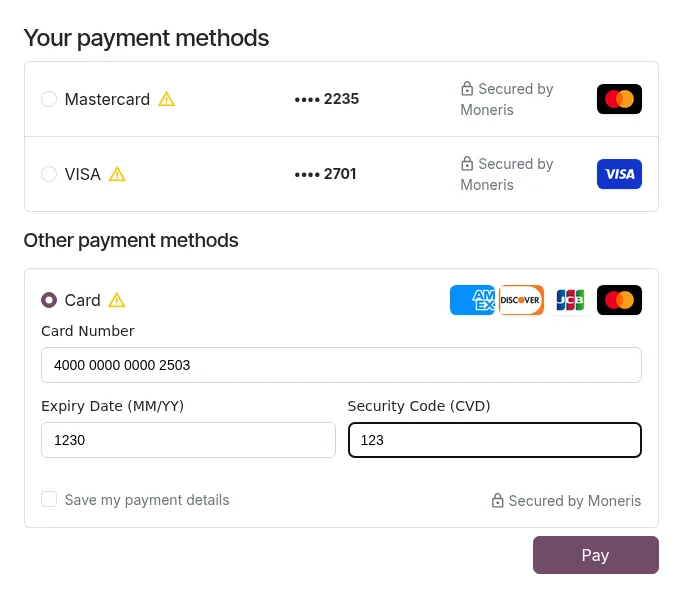
Card payment on your website

The customer types the card in secure Moneris fields built into your Odoo payment page. Returning customers find their saved cards.

Moneris Checkout payment page opened from Odoo

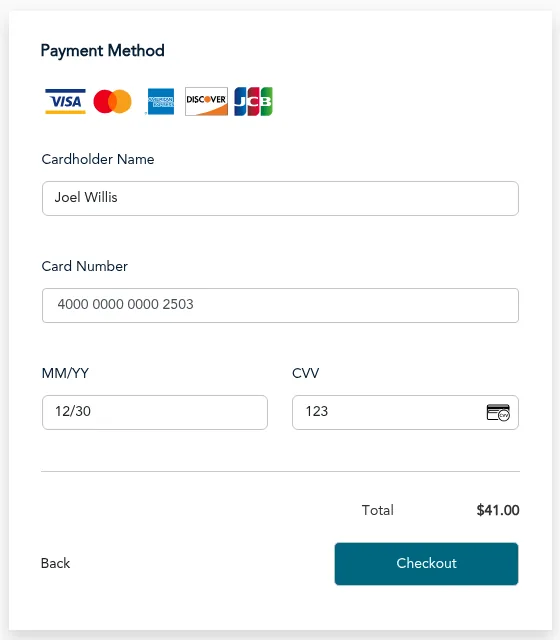
Or payment on the Moneris page

With the other option, the customer pays on the Moneris Checkout page, with the amount, contact details and address already filled in by Odoo.

3-D Secure code asked by the bank during a Moneris payment in Odoo

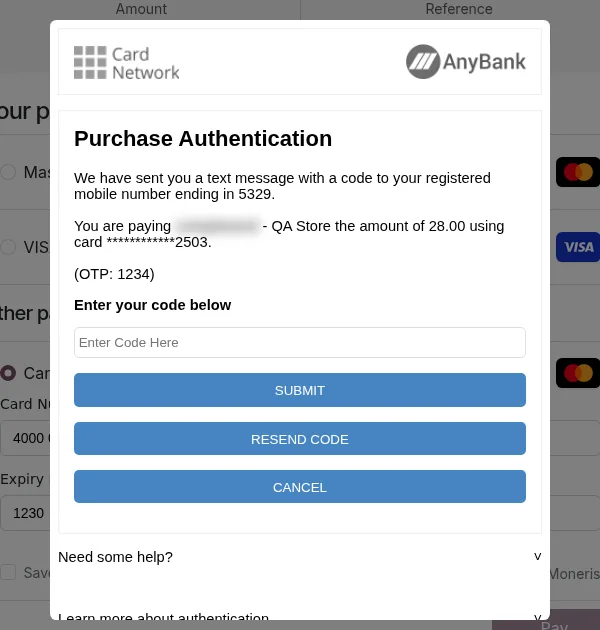
3-D Secure: the code asked by the bank

When the bank asks for it, the customer types the code received by text message. Tested with and without the code, with both payment options.

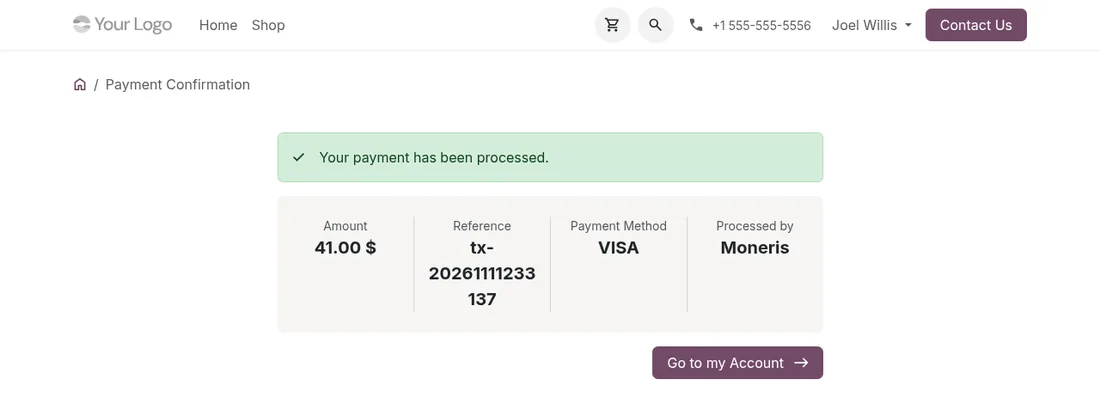
Odoo payment confirmation after a payment on the Moneris Checkout page

Back to the Odoo confirmation

After the Moneris page, the customer comes back to the Odoo confirmation and the order is confirmed.

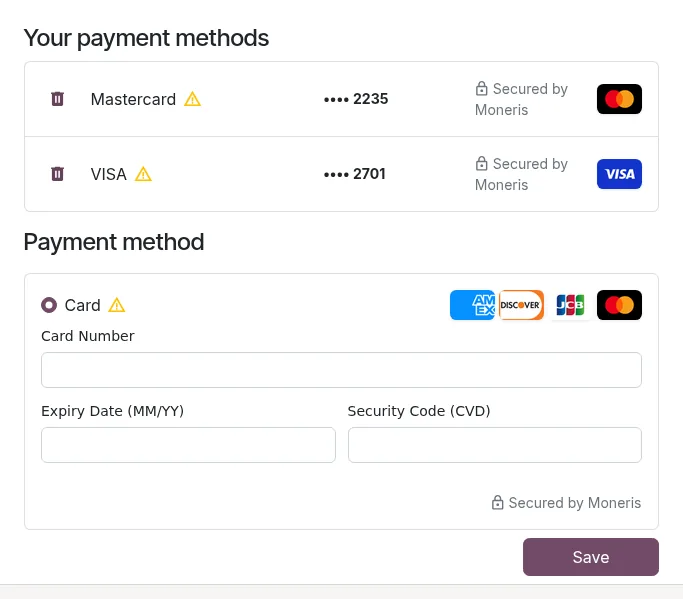
Saved Moneris cards in the Odoo customer portal

Saved cards in the customer portal

The customer adds a card from My Payment Methods: Moneris checks it without charging it. A card deleted in Odoo is also deleted at Moneris.

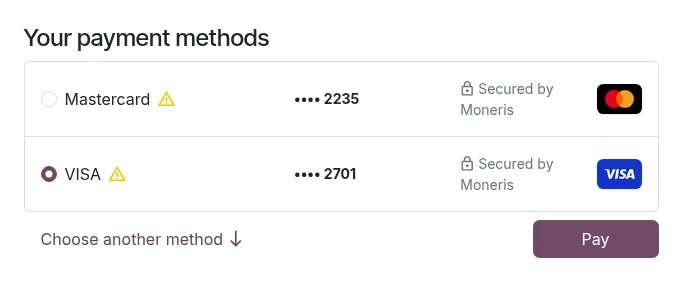
Odoo payment link paid with a card saved at Moneris

One-click payment with a saved card

From a payment link, the signed-in customer picks a card and clicks Pay. The card stays at Moneris.

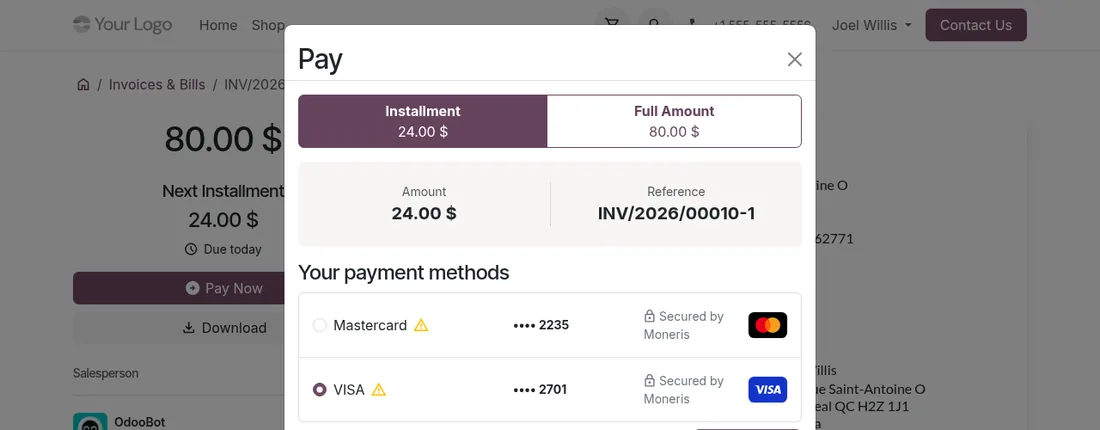
Invoice installment paid by Moneris card in the Odoo customer portal

An invoice installment paid in the portal

The customer pays the installment due on an invoice from the Odoo customer portal, by Moneris card.

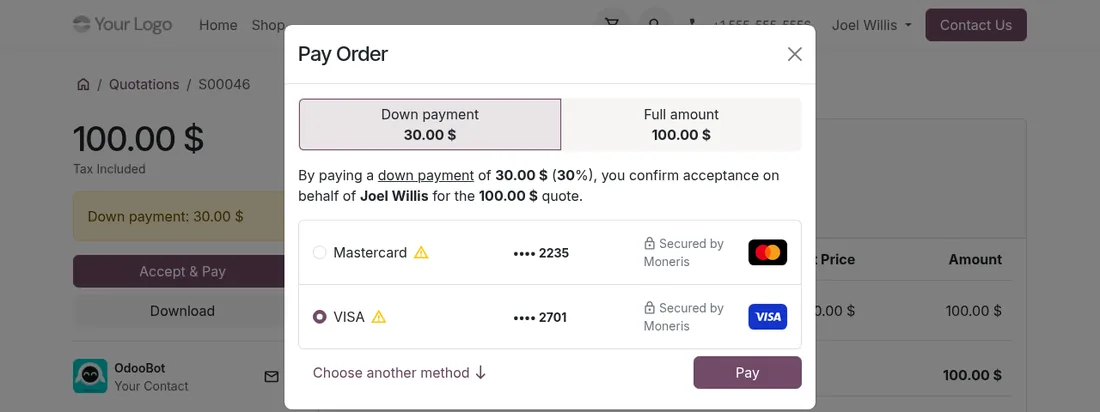
Odoo quotation down payment paid by Moneris card

A quotation down payment

The customer signs the quotation and pays a 30% down payment by card: the quotation is confirmed automatically.

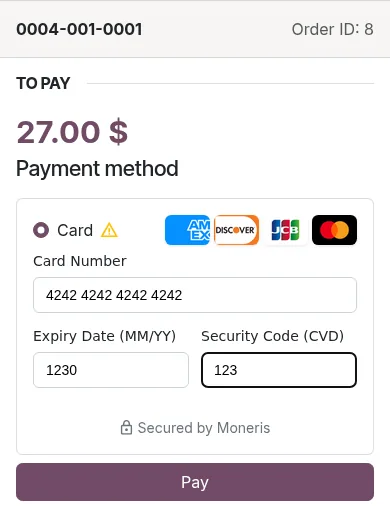
Odoo Point of Sale order paid online by Moneris card

Point of Sale paid online

The customer pays the Point of Sale order online, on their phone, with the Moneris card fields.

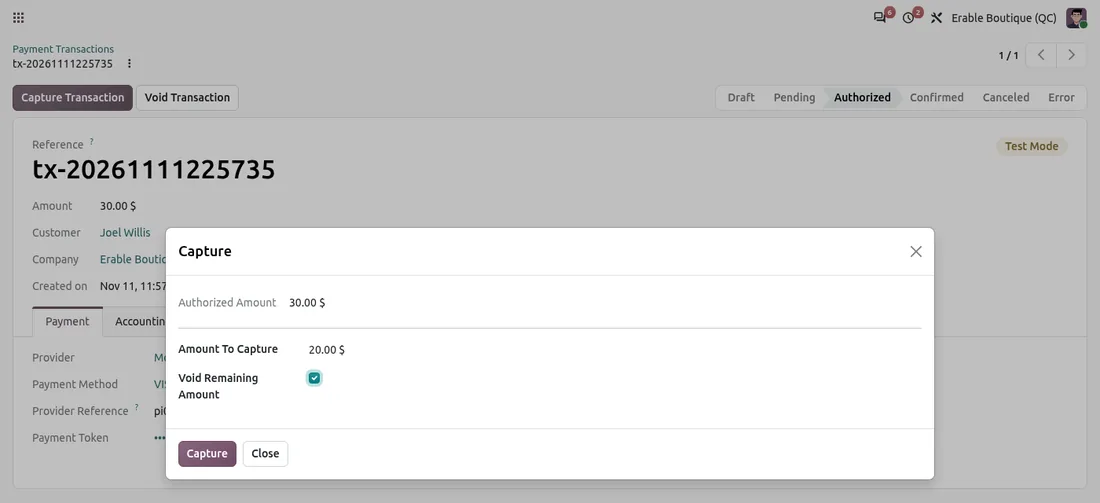
Partial capture of an authorized Moneris payment from Odoo

Partial capture at delivery

The card is authorized at order. When you deliver, capture all or part of the amount, and Moneris releases the rest.

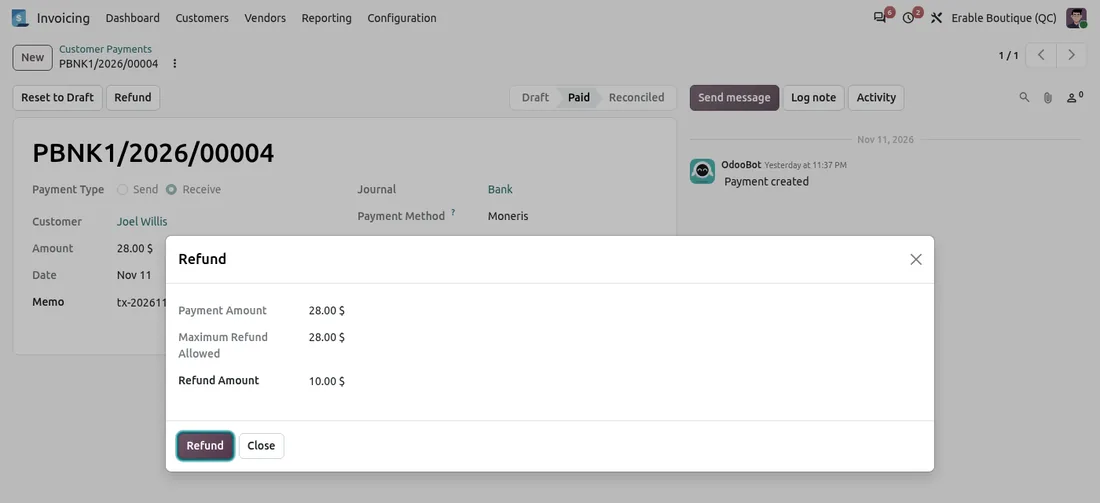
Partial refund of a Moneris payment from the Odoo accounting payment

Several partial refunds

From the accounting payment, refund part of the amount, then another part. An amount above what is left is refused with a clear message.

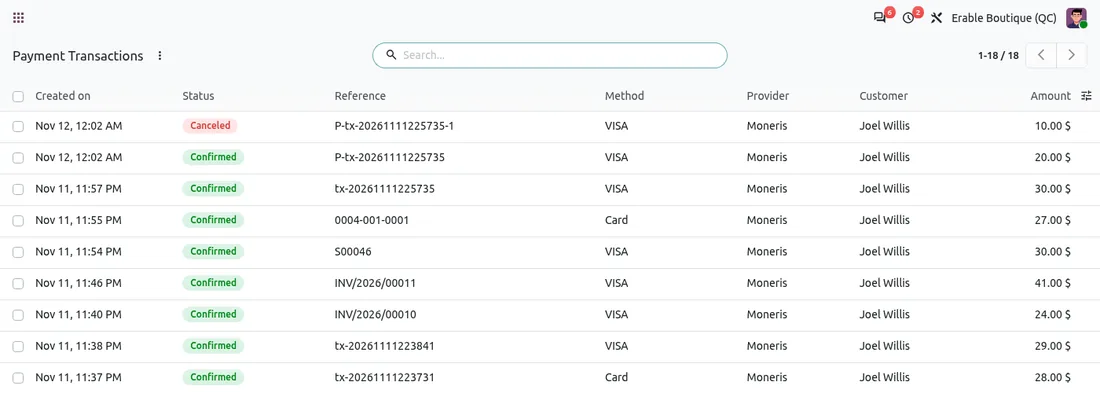
Moneris payment transactions in Odoo

Every transaction tracked in Odoo

Each payment, capture, release and refund appears in Odoo with its reference and status.

Checked at Moneris

The same payments, on the Moneris side

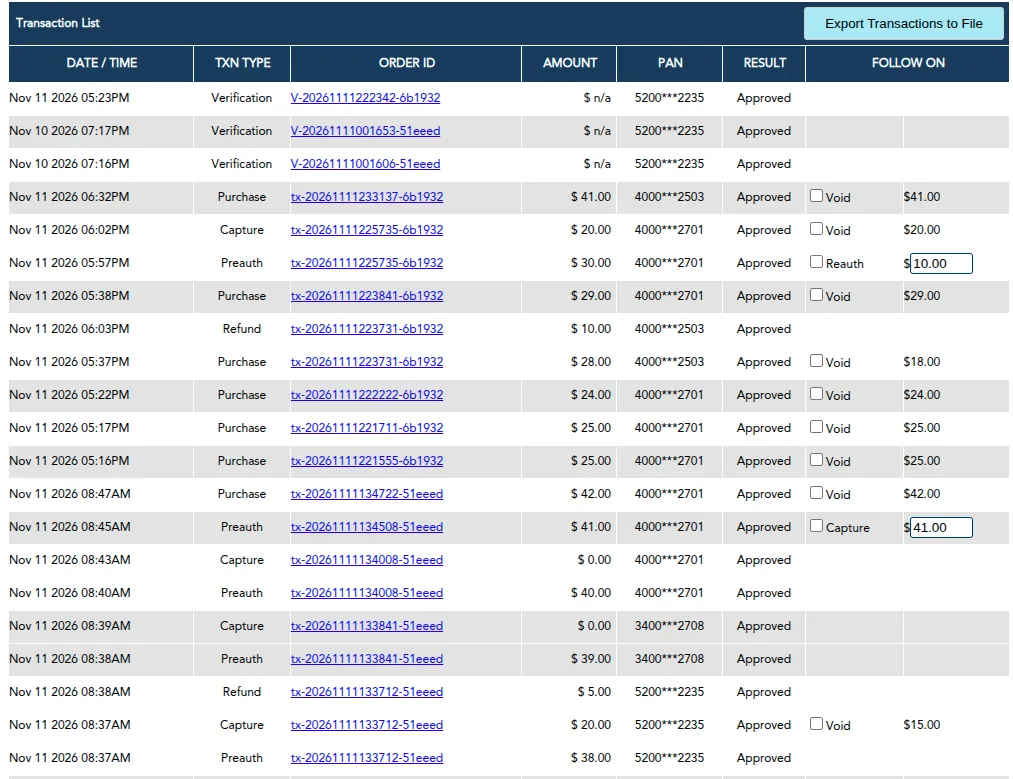
We checked every test on both sides: in Odoo and in the Moneris Merchant Resource Center. The 61 payments approved during our tests were compared one by one: same reference, same amount, same result.

Transactions sent by Odoo in the Moneris Merchant Resource Center

The transaction list at Moneris

Card checks, payments, authorizations, captures, refunds and voids made from Odoo: each one carries the reference of the Odoo transaction.

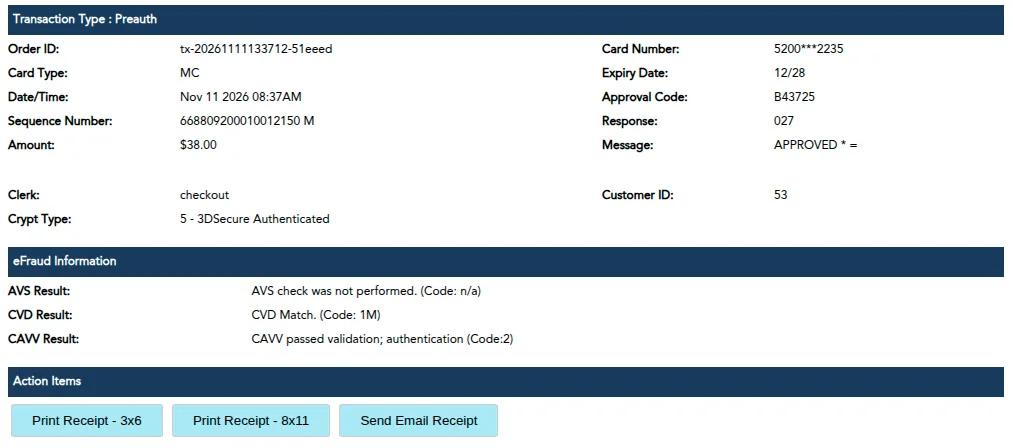
Details at Moneris of an Odoo authorization authenticated by 3-D Secure

The details of an authorization

At Moneris, the payment is authenticated by 3-D Secure and the card security code is checked.

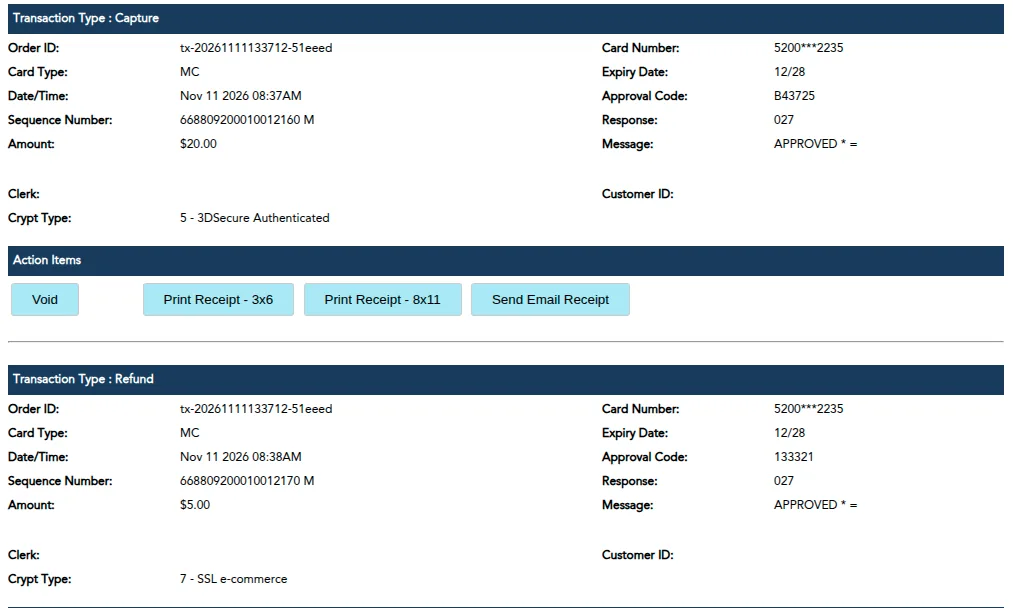
Capture and refund of an Odoo payment in the Moneris Merchant Resource Center

The capture, then the refund

On the same order: the 20 $ capture made from Odoo, then the 5 $ refund, both approved by Moneris.

Two options

Moneris form on your website or Moneris payment page: which one?

You choose the option on the Moneris payment provider in Odoo. Both were tested end to end on the Moneris sandbox.

Form on your websiteMoneris payment page
Where the customer types the cardIn Moneris fields, on your Odoo pageOn the Moneris Checkout page
3-D Secure code from the bankYesYes
Saved cards, subscriptions, payments by your accountantYesNo
Capture at shipping, void, refunds from OdooYesYes
Look and receiptThose of your Odoo websiteSet in your Moneris account
Access to ask Moneris forDeveloper Portal and Hosted Tokenization profileMoneris Checkout profile and store access key

The form on your website suits most shops. The Moneris page suits you if you prefer the customer to pay on a Moneris page.

Day to day

What your team does from Odoo with the Moneris integration

Every operation starts in Odoo and reaches Moneris, with no need to open the Merchant Resource Center.

SituationIn OdooAt Moneris
Order authorized, not shipped yetCapture all or part of it, or void itThe amount not captured is released
A customer returns an itemRefund all or part, in several refundsAccepted the same day, before settlement
Invoice of a customer with a saved cardPay the invoice with that card, or let the subscription renewThe card is charged, the customer types nothing
Answer lost during a paymentThe payment stays pending, then updatesThe payment is found by its reference, never sent again
Customer closes the tab after paying on the Moneris pageThe payment is recorded a few minutes laterOdoo finds the payment at Moneris

Also selling in the United States in US dollars? See our PayTrace Payment Provider for Odoo.

Getting started

What to get from Moneris before installing the Odoo module

What to ask Moneris for depends on the option you choose: form on your website or Moneris payment page.

  • For the form on your website, an application in the Developer Portal: it gives the Client ID and its secret, to enter in Odoo with your Merchant ID.
  • A Hosted Tokenization profile: created in the Merchant Resource Center for the domain of your Odoo website. It is what shows the Moneris card fields on your pages.
  • Administrator access to the Merchant Resource Center: without it, you cannot create that profile. Ask Moneris for it from day one, for testing as well as production.
  • For the Moneris payment page: a Moneris Checkout profile, created in the Merchant Resource Center (purchase, or preauthorization if you capture at shipping), with your store ID and its access key.
  • Your currencies: Moneris settles in Canadian dollars. To take other currencies, ask for Multi-Currency Pricing, then tick it in Odoo.

Without Multi-Currency Pricing, the module only shows on price lists and websites in Canadian dollars. Want to see it on your own flows? Ask for a demo.

With the module

An Odoo agency behind the module

Buying the module is the first step. We can take care of the rest with you.

Installation and setup

We install the module on your database, enter your credentials and test the whole flow before going live.

Support by its developers

Questions and fixes are handled by the team that wrote the module, not by a ticket relay.

Odoo support

Tailored adaptations

Specific rules for your business go in a separate module, so updates stay simple.

Odoo development
Setup

Put the module into service in four steps

  1. Buy it on the Odoo Store

    The licence is sold by Odoo; the module is then available for your database.

  2. Install it

    On Odoo.sh or on your own server, like any Odoo module.

  3. Configure it

    Enter the credentials of your provider and choose the options you need.

  4. Test, then go live

    Validate the whole flow in test mode, then switch to production.

Moneris Odoo Integration: Our New Card Payment Module

Our new Moneris module connects Canada's largest card payment processor to Odoo. What your customers see, what your team does from Odoo, the payment flows we tested and how to get started.

Read the article
Questions about Moneris Payment Provider

Does the Moneris Odoo module accept currencies other than the Canadian dollar?

Yes, if Moneris enabled Multi-Currency Pricing on your account: then tick the option of the same name in Odoo. Otherwise Moneris only accepts Canadian dollars, and the module is only offered in that currency.

Can I refund a Moneris payment on the same day?

Yes. Moneris accepts refunds on the day of the payment, in full or in part, and several times if needed. A full refund on the same day simply cancels the purchase at Moneris.

What is the Hosted Tokenization profile?

It is the Moneris setting that allows your website to show the card fields hosted by Moneris. You create it in the Merchant Resource Center for the domain of your site, and enter its ID in Odoo.

Can several Odoo databases use the same Moneris store?

Yes. Moneris refuses the same order reference twice on a store, so the module adds a code specific to each database to the reference: two databases never get in each other's way.

What if the customer closes the page after paying at Moneris?

The payment is not lost. If the customer did not come back to your website, Odoo asks Moneris a few minutes later, finds the payment and confirms the order or the invoice.

Does the module work on Odoo Online?

No: Odoo Online does not accept third-party modules. It installs on Odoo.sh or on your own Odoo server.

Can you install and configure it for us?

Yes. We install the module, configure it with your credentials, test it in test mode and switch to production with you.

Ask for an installation

Who supports the module?

The DevTalents team that developed it: fixes, compatibility with new Odoo versions and configuration questions.

Can the module be adapted to our needs?

Yes. We add the rules specific to your business in a separate module, so that updates stay simple.

Odoo development

Same category

Similar Odoo modules

Alma Payment Provider - Odoo module

Payment Providers

Alma Payment Provider

Alma official partner: let your customers pay in 1x–12x installments. Eligibility widget, category exclusion and Alma-approved integration.

Alma POS - Odoo module

Payment Providers

Alma POS

Alma in the Odoo Point of Sale: your customers pay in store now or in 2 to 12 instalments, on their phone. QR code on the cashier and customer display, SMS link or payment on the store's screen, order validated as soon as the customer has paid, refunds from the POS.

All our Odoo modules

A module to adapt or to create?

Tell us what you need: we reply within 48 hours.

Discuss your project
Billy, the DevTalents mascot, answering a message on his phone