
DevTalents

CAWL for Odoo: Crédit Agricole and LCL Payments

Crédit Agricole & Worldline acquirer: CB, Visa, Amex, Apple/Google Pay, PayPal, Klarna, BNPL and tokenization.

  • #Apple Pay / Google Pay
  • #BNPL
  • #CB / Visa / Mastercard
  • #French Bank
  • #Klarna
  • #PayPal
  • #Tokenization
  • Developed by DevTalents
  • Support by the team that wrote it
  • Installation on request
Billy, the DevTalents mascot, presenting the Odoo module

What the module does

  • All 32 CAWL payment methods

    Cards, Apple Pay and Google Pay, PayPal, Wero, iDEAL, TWINT, Klarna, Oney and Sofinco, meal vouchers, Chèque-Vacances and gift cards.

  • Only the contract side to activate

    The module already supports every method: ask your Crédit Agricole or LCL adviser to enable the ones you want on your CAWL contract.

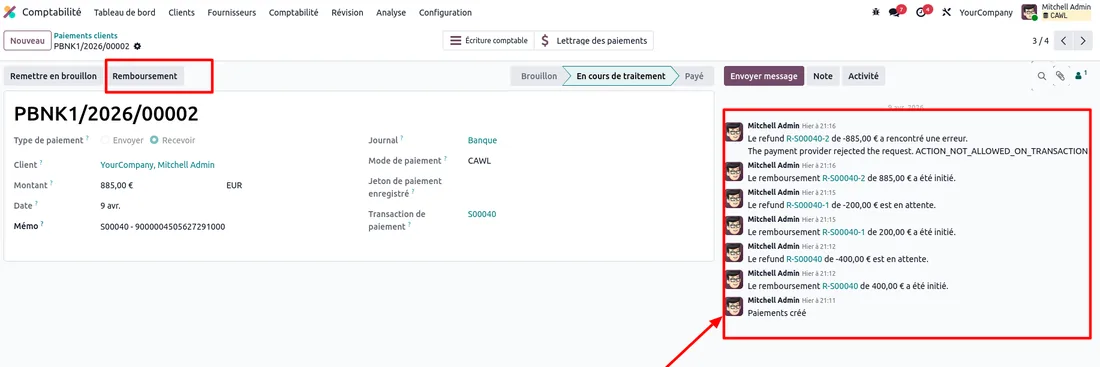
  • Full and partial refunds from Odoo

    Confirmed automatically by a CAWL webhook.

  • Manual capture and void

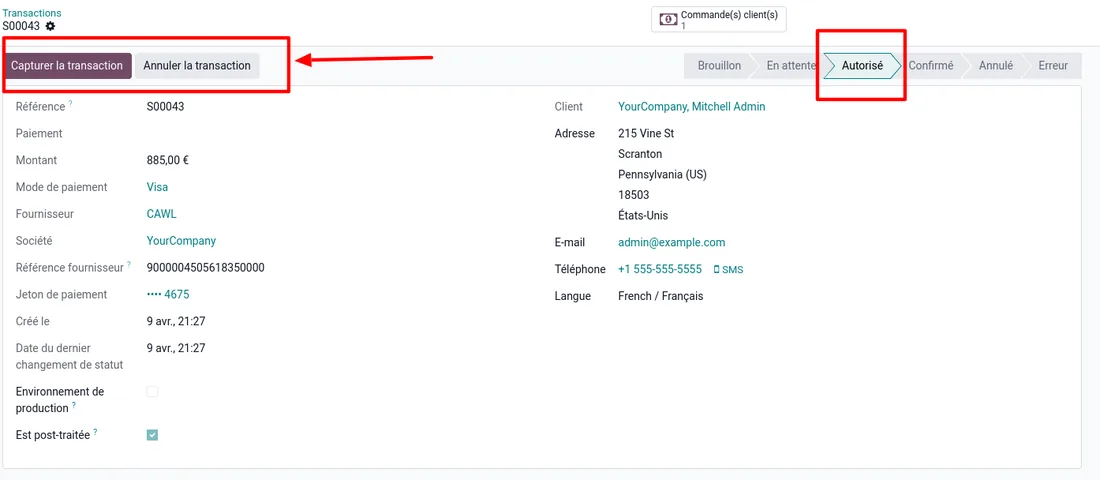
    Authorize now and capture later, for hotels, car rentals or pre-orders, or cancel the authorization.

  • Tokenization

    Cards saved securely for recurring payments and merchant-initiated transactions on subscriptions.

  • 3D Secure 2

    Strong customer authentication, with the redirection handled automatically when the bank requires it.

  • Signed real-time webhooks

    HMAC-SHA256 notifications keep the status of each transaction in sync with CAWL.

  • Restrictions by country and currency

    Each method is offered only where CAWL accepts it; every method was checked against the official CAWL documentation.

In pictures

Crédit Agricole CAWL payments in Odoo

Real screenshots, taken on the CAWL pre-production environment.

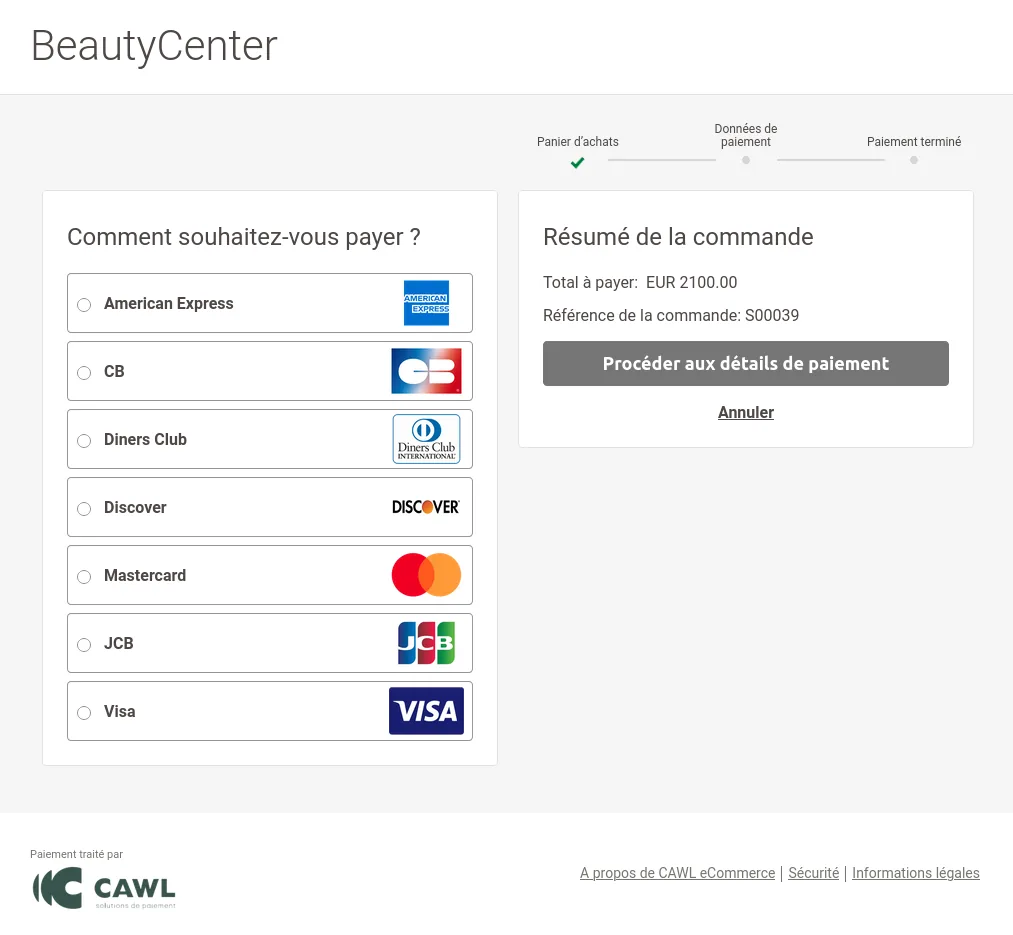
Crédit Agricole CAWL hosted payment page with the card choice

The CAWL payment page

After “Pay now”, the customer lands on the secure CAWL page and picks a card: CB, Visa, Mastercard, American Express, JCB, Discover or Diners Club.

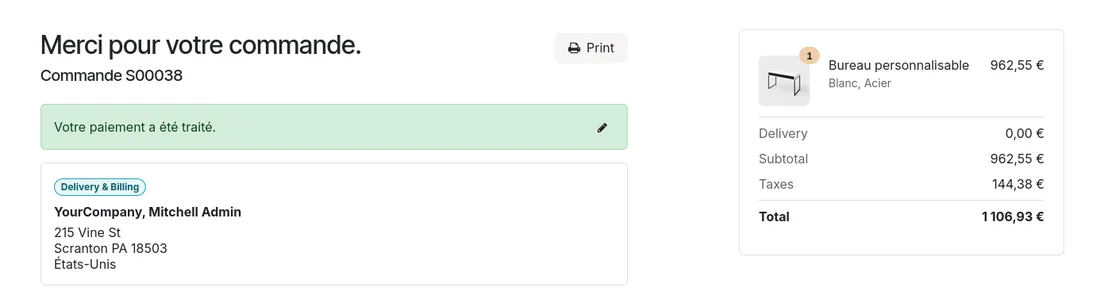
Odoo order confirmation after a CAWL card payment

The order paid in Odoo

Once the payment is accepted, the customer returns to your shop and sees the order confirmed.

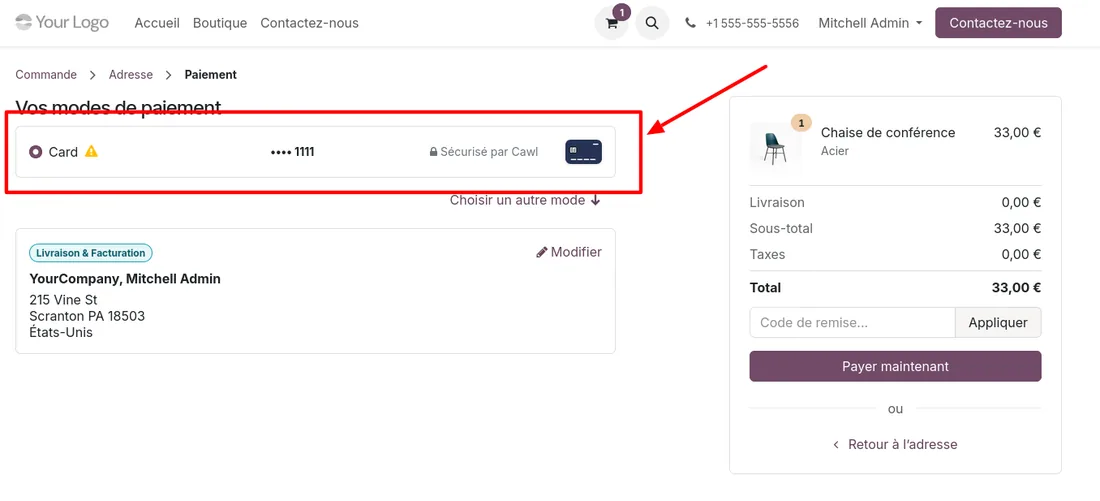
Payment with a saved CAWL card on the Odoo eCommerce

The card saved for next time

A customer who saved a card finds it at the next checkout, with its last four digits, and pays without typing it again.

Authorized CAWL transaction with Capture and Void buttons in Odoo

Capture or cancel from Odoo

With manual capture, the amount is held on the card. Your team captures it at shipping, or cancels to release the funds.

History of CAWL refunds on an Odoo customer payment

Refunds tracked on the payment

Refund in full or in part from the customer payment, several times if needed. Each request and its answer is logged in the history.

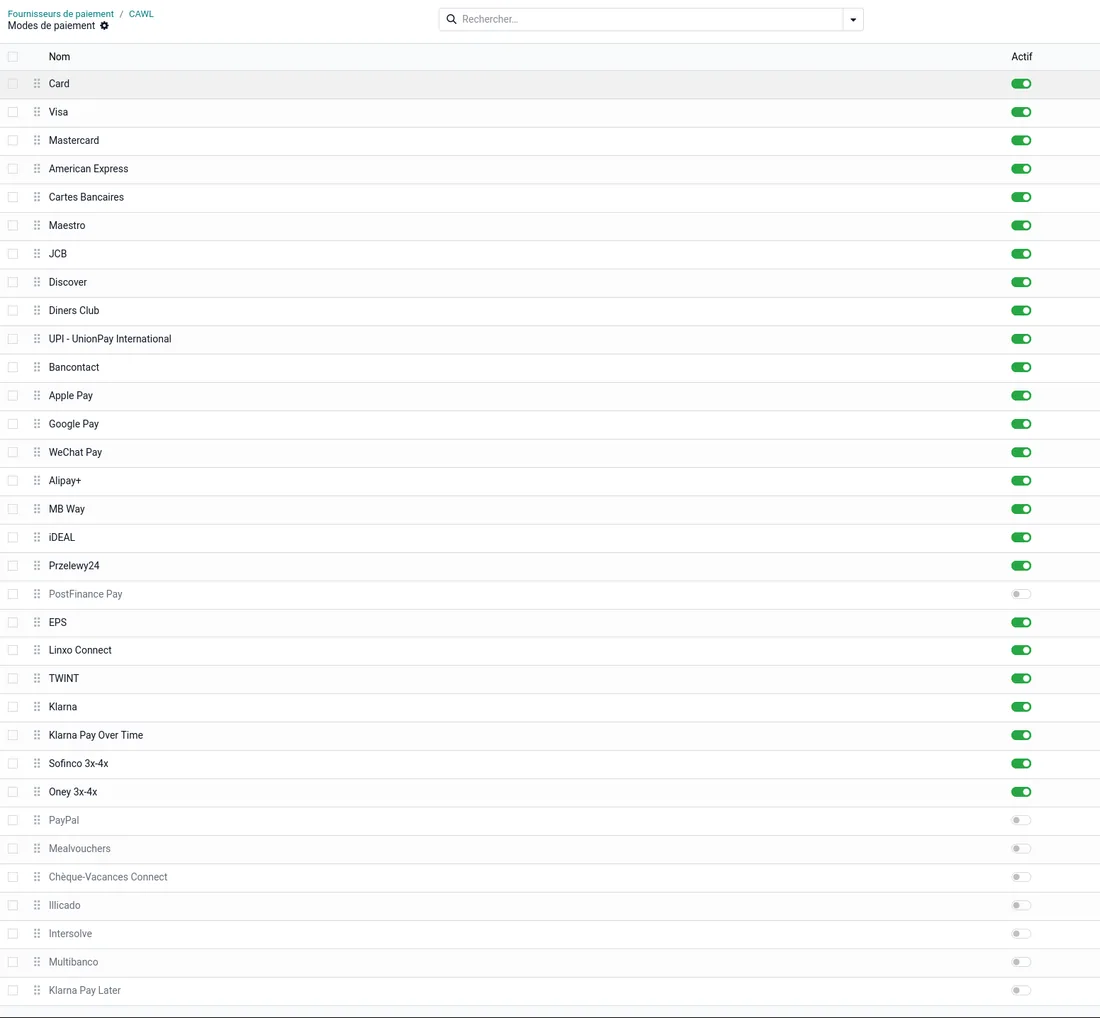
List of CAWL payment methods to activate in Odoo

Payment means, one by one

Each CAWL payment means has its own record in Odoo. Turn on those of your contract and leave the others off.

Before you choose

CAWL or Up2pay e-Transactions: which module for your Crédit Agricole contract?

Crédit Agricole has two online payment offers. The name of your contract and your credentials point to the right module.

CAWL (this module)Up2pay e-Transactions
BanksCrédit Agricole and LCLCrédit Agricole
Credentials you receiveA merchant ID (PSPID) and keys created in the CAWL back officeA site number, a rank, an identifier and a key
Payment meansCards, wallets, pay in instalments, gift cards... depending on your contractCB, Visa and Mastercard cards

Is your contract Up2pay e-Transactions? See our Up2pay e-Transactions module, or Paybox Direct to take the card on your own page.

Getting started

What to ask CAWL before installing the module

Your Crédit Agricole or LCL adviser opens the contract. The rest is prepared in the CAWL back office.

  • The merchant ID (PSPID) of your CAWL account, in test and then in production.
  • The access keys and the notification keys: created in the CAWL back office, they go into the Credentials tab of the provider.
  • The payment means to open: the module handles them all, but each one must be enabled on your contract. Ask for those you need.
  • The “group cards” option: it puts every card under a single “Pay by card” button on the CAWL page, simpler for the customer.

A payment means turned on in Odoo but not on your contract will not work: align both lists before opening the shop. To hold the amount and capture it later (rentals, pre-orders), tick manual capture on the provider.

With the module

An Odoo agency behind the module

Buying the module is the first step. We can take care of the rest with you.

Installation and setup

We install the module on your database, enter your credentials and test the whole flow before going live.

Support by its developers

Questions and fixes are handled by the team that wrote the module, not by a ticket relay.

Odoo support

Tailored adaptations

Specific rules for your business go in a separate module, so updates stay simple.

Odoo development
Setup

Put the module into service in four steps

  1. Buy it on the Odoo Store

    The licence is sold by Odoo; the module is then available for your database.

  2. Install it

    On Odoo.sh or on your own server, like any Odoo module.

  3. Configure it

    Enter the credentials of your provider and choose the options you need.

  4. Test, then go live

    Validate the whole flow in test mode, then switch to production.

CAWL for Odoo: the Online Payment Solution of Crédit Agricole and LCL

CAWL is the online payment offer of Crédit Agricole and LCL. Our module adds it to Odoo: cards, mobile payments, instalments, local European methods and meal vouchers, with saved cards, payment at shipping and refunds straight from Odoo.

Read the article
Questions about CAWL Payment Provider

Does the CAWL module work for an LCL customer?

Yes. CAWL is distributed by Crédit Agricole and by LCL: the module connects to your CAWL account, whichever bank opened the contract.

Are all payment means active right after installing?

No. The module provides the 32 CAWL payment means, but only those open on your contract work. Your adviser enables them, then you turn them on in Odoo.

Can an amount be held and captured later?

Yes, with manual capture. The payment stays authorized until your team captures or cancels it from the Odoo transaction, for instance at shipping or at the end of a rental.

Can customers save their card?

Yes, if you allow saving on the provider. The card is kept by CAWL, not by Odoo, and the customer finds it at the next checkout without typing it again.

Does the module work on Odoo Online?

No: Odoo Online does not accept third-party modules. It installs on Odoo.sh or on your own Odoo server.

Can you install and configure it for us?

Yes. We install the module, configure it with your credentials, test it in test mode and switch to production with you.

Ask for an installation

Who supports the module?

The DevTalents team that developed it: fixes, compatibility with new Odoo versions and configuration questions.

Can the module be adapted to our needs?

Yes. We add the rules specific to your business in a separate module, so that updates stay simple.

Odoo development

Same category

Similar Odoo modules

Alma Payment Provider - Odoo module

Payment Providers

Alma Payment Provider

Alma official partner: let your customers pay in 1x–12x installments. Eligibility widget, category exclusion and Alma-approved integration.

Alma POS - Odoo module

Payment Providers

Alma POS

Alma in the Odoo Point of Sale: your customers pay in store now or in 2 to 12 instalments, on their phone. QR code on the cashier and customer display, SMS link or payment on the store's screen, order validated as soon as the customer has paid, refunds from the POS.

All our Odoo modules

A module to adapt or to create?

Tell us what you need: we reply within 48 hours.

Discuss your project
Billy, the DevTalents mascot, answering a message on his phone